

A new product by XenCustomize is available: Word Meanings 2.0.0 - Build a powerful dictionary, glossary, vocabulary database, or multilingual word meanings system directly inside XenForo.
Build a searchable dictionary, glossary, vocabulary database, or multilingual word meanings system directly inside XenForo.
XenCustomize Word Meanings adds a native XenForo dictionary system with public word pages, translation-backed language meanings, alphabet browsing, contributor submissions, approval workflows, widgets, SEO-friendly URLs, and Admin CP management.
It is built for communities that publish definitions, translations, word meanings, vocabulary references, educational content, glossary entries, or multilingual dictionary data while keeping everything inside XenForo.
 Create a public dictionary inside XenForo with searchable word, definition, and meaning pages
 Manage multilingual word translations using admin-defined language fields
 Let visitors browse by language, alphabet, latest words, or search
 Allow members to contribute words with permissions and moderation
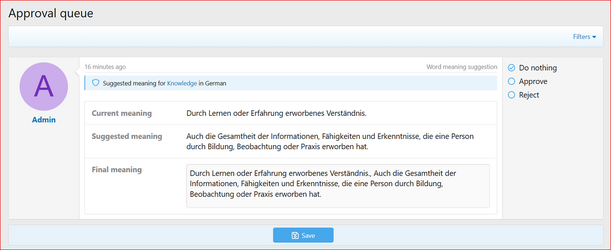
 Accept suggested meaning edits safely through XenForo's approval queue
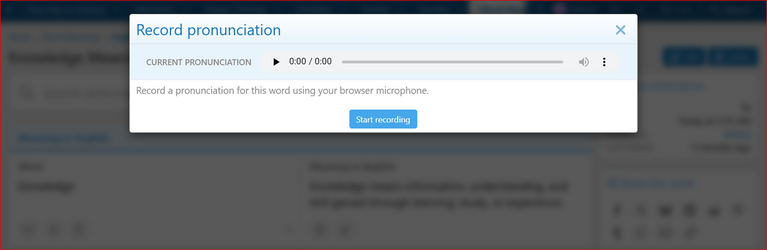
 Add pronunciation audio so word pages can include listen controls
 Show dictionary widgets and statistics across your site
 Import Scandals/xFGlossary data using XenForo's standard importer system
 Native public dictionary section
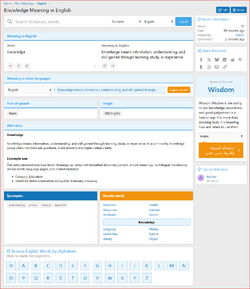
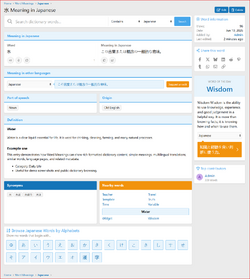
Word Meanings adds public dictionary pages where visitors can browse words, view rich definitions, select language meanings, explore related words, and move through dictionary content naturally.
Translation-backed multilingual meanings
Language meanings are stored as dedicated translation records. Each language can have its own:
 Rich word definitions
Each main word can include a rich XenForo editor definition, separate from shorter language meanings. This gives you room for detailed definitions, examples, notes, lists, and formatted educational content.
 Modern dictionary search
Includes a clean search bar with autocomplete support, match type selection, and language filtering. Searches can find main words, translated word titles, meanings, and similar words depending on the selected language and match type.
Alphabet browsing
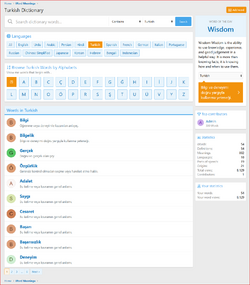
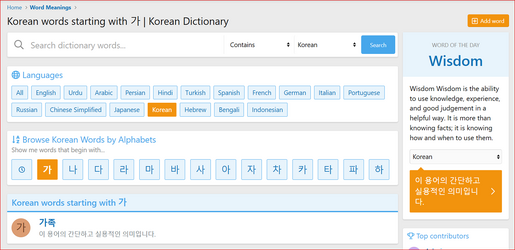
Visitors can browse words by starting letter, latest words, or selected language. Each language can use its own admin-defined alphabet, so non-English languages are not limited to A-Z browsing.
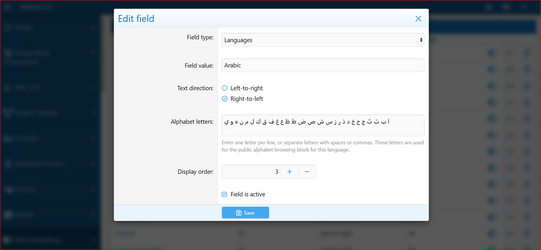
 Right-to-left and left-to-right language support
Languages can be configured as LTR or RTL. Word meanings, widgets, language lists, alphabet blocks, and language-specific content display more naturally for languages such as Urdu, Arabic, Persian, Sindhi, and other right-to-left languages.
 Word view pages
Each word page can show:
 Quick word tools
Word pages include useful visitor tools such as listen, copy word, copy meaning, and suggest an edit.
Pronunciation audio support
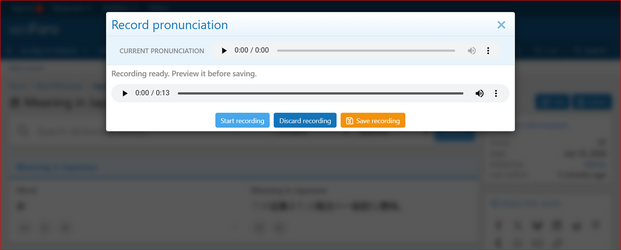
Admins and permitted users can upload, replace, remove, or record pronunciation audio for words. Browser-based recording lets permitted users record through their microphone, preview the audio, discard it, or save it before replacing the existing pronunciation. Audio files are cleaned up when words are permanently deleted.
Public add, edit, and delete workflows
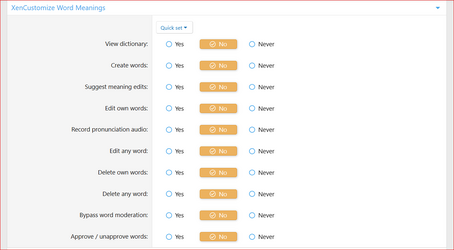
Members with permission can add new words, edit existing words, and delete words. Word submissions can require approval depending on permissions.
Moderation and approval support
New words and suggested edits can use XenForo's approval queue so staff can review content before it becomes publicly visible.
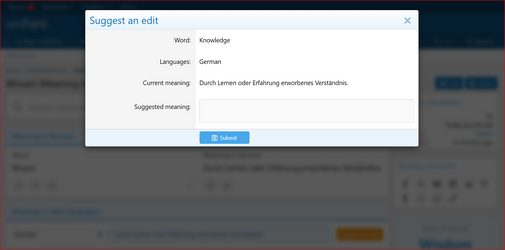
 Suggest an edit
Members and guests can suggest meaning edits through an overlay form. Guest suggestions can use XenForo CAPTCHA protection.
Staff can review:
This helps staff approve useful suggestions without blindly overwriting or awkwardly appending content.
 Admin-managed dictionary fields
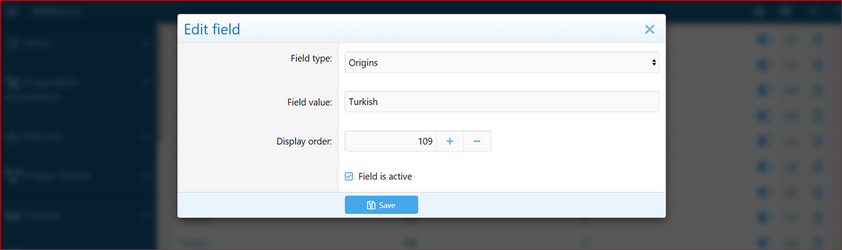
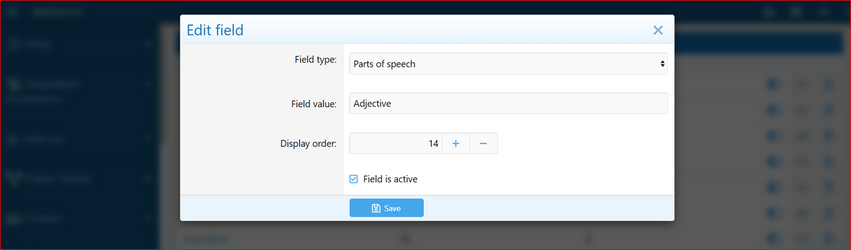
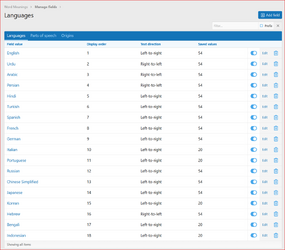
Admins can manage:
Languages can include display order, active status, text direction, and custom alphabet letters.
 Flexible language setup
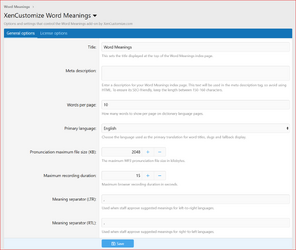
The addon ships with a clean default setup and lets admins add the languages they need. Admins can also choose the primary language used for primary word titles, slugs, and fallback display. This makes it suitable for English dictionaries, bilingual dictionaries, multilingual word databases, and community-driven vocabulary projects.
Widgets included
Add dictionary widgets to XenForo widget positions, including:
The Word of the Day widget supports language selection without reloading the page.
 Dictionary statistics
Dictionary pages can show compact statistics such as total words, meanings, languages, parts of speech, origins, views, and contributors.
 Contributor statistics
Word Meanings tracks user word counts and supports a member statistics page for most dictionary words.
 Native sharing support
Word pages include a XenForo-style sharing block so visitors can share individual word pages more easily.
 SEO-friendly URLs
Uses clean public routes under /word-meanings/, including language pages, alphabet pages, and language-specific word URLs.
Examples:
 Admin Control Panel management
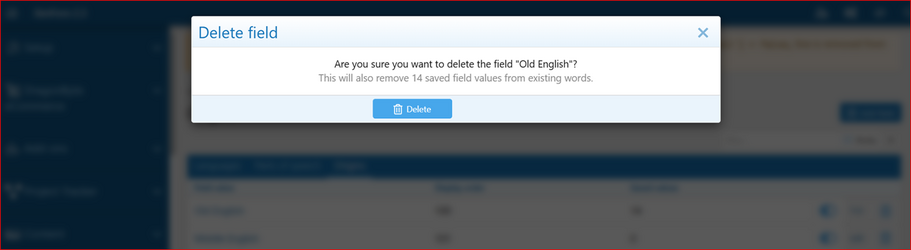
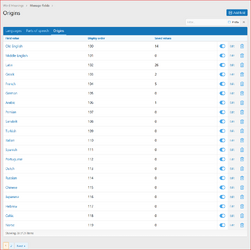
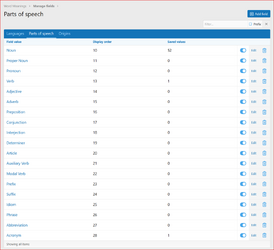
The Admin CP includes field management with field type tabs, quick filtering, pagination, active toggles, overlays, and delete confirmations.
 Legacy data migration support
Existing supported legacy Word Meanings installations can be migrated during installation/upgrade so existing words, fields, meanings, view counts, contributors, and pronunciation files can be preserved.
Scandals/xFGlossary importer
Includes a standard XenForo importer for Scandals/xFGlossary through Tools > Import data. It can import glossary terms as Word Meanings words and lets admins map source fields to existing Word Meanings languages, parts of speech, and origins.
After installation, go to the add-on options and open the License options tab to enter your license key. If you have a branding-free license key, you may enter it there as well to remove branding.
License verification may use XenCustomize.com with local caching. Normal installation and uninstallation do not depend on our server being available. An expired license does not disable normal use of the add-on, but an active valid license is required for official support and access to new downloads or updates released after the license expires.
Built by the same XenCustomize team behind complex large-scale addons such as Events Manager, News Publisher, and Survey Manager, with the same focus on detail, long-term support, and XenForo-native quality.
If you want to run a dictionary, glossary, vocabulary, or multilingual word meanings section inside XenForo, XenCustomize Word Meanings gives you the public pages, translation tools, contribution workflows, moderation support, widgets, import support, and admin controls needed to manage it in a native XenForo way.
Get your copy of Word Meanings 2.0.0 today!
XenCustomize Word Meanings for XenForo 2
Build a searchable dictionary, glossary, vocabulary database, or multilingual word meanings system directly inside XenForo.XenCustomize Word Meanings adds a native XenForo dictionary system with public word pages, translation-backed language meanings, alphabet browsing, contributor submissions, approval workflows, widgets, SEO-friendly URLs, and Admin CP management.
It is built for communities that publish definitions, translations, word meanings, vocabulary references, educational content, glossary entries, or multilingual dictionary data while keeping everything inside XenForo.
 Key Benefits
Create a public dictionary inside XenForo with searchable word, definition, and meaning pages Manage multilingual word translations using admin-defined language fields Let visitors browse by language, alphabet, latest words, or search Allow members to contribute words with permissions and moderation Accept suggested meaning edits safely through XenForo's approval queue Add pronunciation audio so word pages can include listen controls Show dictionary widgets and statistics across your site Import Scandals/xFGlossary data using XenForo's standard importer system Features
Native public dictionary sectionWord Meanings adds public dictionary pages where visitors can browse words, view rich definitions, select language meanings, explore related words, and move through dictionary content naturally.
Translation-backed multilingual meaningsLanguage meanings are stored as dedicated translation records. Each language can have its own:
- Translated word/title
- Language-specific URL slug
- Meaning text
- Similar words
- Text direction support
Rich word definitionsEach main word can include a rich XenForo editor definition, separate from shorter language meanings. This gives you room for detailed definitions, examples, notes, lists, and formatted educational content.
Modern dictionary searchIncludes a clean search bar with autocomplete support, match type selection, and language filtering. Searches can find main words, translated word titles, meanings, and similar words depending on the selected language and match type.
Alphabet browsingVisitors can browse words by starting letter, latest words, or selected language. Each language can use its own admin-defined alphabet, so non-English languages are not limited to A-Z browsing.
Right-to-left and left-to-right language supportLanguages can be configured as LTR or RTL. Word meanings, widgets, language lists, alphabet blocks, and language-specific content display more naturally for languages such as Urdu, Arabic, Persian, Sindhi, and other right-to-left languages.
Word view pagesEach word page can show:
- Main word title
- Selected language word/title
- Selected language meaning
- Rich definition
- Parts of speech
- Origins
- Language-specific similar words
- Nearby words
- Pronunciation audio
- Views, date, contributor, and edit information
Quick word toolsWord pages include useful visitor tools such as listen, copy word, copy meaning, and suggest an edit.
Pronunciation audio supportAdmins and permitted users can upload, replace, remove, or record pronunciation audio for words. Browser-based recording lets permitted users record through their microphone, preview the audio, discard it, or save it before replacing the existing pronunciation. Audio files are cleaned up when words are permanently deleted.
Public add, edit, and delete workflowsMembers with permission can add new words, edit existing words, and delete words. Word submissions can require approval depending on permissions.
Moderation and approval supportNew words and suggested edits can use XenForo's approval queue so staff can review content before it becomes publicly visible.
Suggest an editMembers and guests can suggest meaning edits through an overlay form. Guest suggestions can use XenForo CAPTCHA protection.
Staff can review:
- Existing meaning
- Suggested meaning
- Editable final meaning before approval
This helps staff approve useful suggestions without blindly overwriting or awkwardly appending content.
Admin-managed dictionary fieldsAdmins can manage:
- Languages
- Parts of speech
- Origins
Languages can include display order, active status, text direction, and custom alphabet letters.
Flexible language setupThe addon ships with a clean default setup and lets admins add the languages they need. Admins can also choose the primary language used for primary word titles, slugs, and fallback display. This makes it suitable for English dictionaries, bilingual dictionaries, multilingual word databases, and community-driven vocabulary projects.
Widgets includedAdd dictionary widgets to XenForo widget positions, including:
- Word of the day
- Top contributors
The Word of the Day widget supports language selection without reloading the page.
Dictionary statisticsDictionary pages can show compact statistics such as total words, meanings, languages, parts of speech, origins, views, and contributors.
Contributor statisticsWord Meanings tracks user word counts and supports a member statistics page for most dictionary words.
Native sharing supportWord pages include a XenForo-style sharing block so visitors can share individual word pages more easily.
SEO-friendly URLsUses clean public routes under /word-meanings/, including language pages, alphabet pages, and language-specific word URLs.
Examples:
- /word-meanings/
- /word-meanings/language/arabic/
- /word-meanings/language/arabic/?filter=م
- /word-meanings/word/example/arabic/
Admin Control Panel managementThe Admin CP includes field management with field type tabs, quick filtering, pagination, active toggles, overlays, and delete confirmations.
Legacy data migration supportExisting supported legacy Word Meanings installations can be migrated during installation/upgrade so existing words, fields, meanings, view counts, contributors, and pronunciation files can be preserved.
Scandals/xFGlossary importerIncludes a standard XenForo importer for Scandals/xFGlossary through Tools > Import data. It can import glossary terms as Word Meanings words and lets admins map source fields to existing Word Meanings languages, parts of speech, and origins.
 Specifications
- Supported XenForo version: XenForo 2.3.0+
- Public dictionary pages: Yes
- Translation-backed language meanings: Yes
- Language-specific word titles and slugs: Yes
- Language-specific similar words: Yes
- Custom language alphabets: Yes
- Alphabet browsing: Yes
- Search autocomplete: Yes
- Public word submission: Yes
- Word moderation support: Yes
- Suggested edit approval support: Yes
- Pronunciation audio upload: Yes
- Browser pronunciation recording: Yes
- Primary language option: Yes
- Right-to-left language display support: Yes
- Widgets included: Yes
- Dictionary statistics blocks: Yes
- Member word count statistic support: Yes
- Admin field management: Yes
- Scandals/xFGlossary importer: Yes
- Translation-ready phrases: Yes
- Visible branding: Yes
 Use Cases
- Language learning communities that want a community-powered dictionary
- Educational forums that publish vocabulary, definitions, examples, and meanings
- Multilingual communities that want word meanings in multiple languages
- Glossary-based sites that need searchable term and definition pages
- Communities migrating old dictionary or glossary data into XenForo 2.3
- Sites moving glossary content from Scandals/xFGlossary into Word Meanings
- Forums that want members to contribute words while staff keep approval control
Good To Know
- Word Meanings is built around a main word record with language-specific translated titles, meanings, similar words, and URLs.
- Language pages are designed for multilingual dictionary browsing, with admin-defined alphabets and text direction support for each language.
- Languages, parts of speech, and origins are managed by admins as flexible Word Meanings fields.
- The Scandals/xFGlossary importer gives admins control by importing into existing Word Meanings fields selected during import.
- Browser pronunciation recording uses the visitor's browser microphone support and the Word Meanings recording permission.
- Visible branding is included by default.
 Requirements
- XenForo 2.3.0+
- XenCustomize Core Library 1.0.2+ (free for customers).
 License Setup
After installation, go to the add-on options and open the License options tab to enter your license key. If you have a branding-free license key, you may enter it there as well to remove branding.License verification may use XenCustomize.com with local caching. Normal installation and uninstallation do not depend on our server being available. An expired license does not disable normal use of the add-on, but an active valid license is required for official support and access to new downloads or updates released after the license expires.
 A dictionary system built for XenForo
Built by the same XenCustomize team behind complex large-scale addons such as Events Manager, News Publisher, and Survey Manager, with the same focus on detail, long-term support, and XenForo-native quality.If you want to run a dictionary, glossary, vocabulary, or multilingual word meanings section inside XenForo, XenCustomize Word Meanings gives you the public pages, translation tools, contribution workflows, moderation support, widgets, import support, and admin controls needed to manage it in a native XenForo way.
Get your copy of Word Meanings 2.0.0 today!
Attachments
-
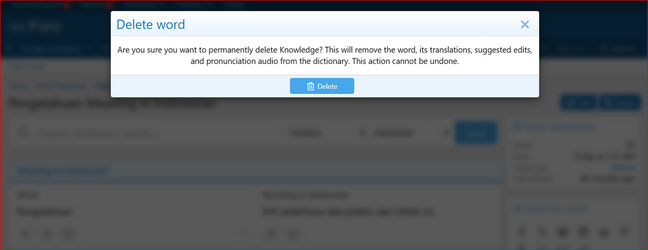 XenCustomize-Word-Meanings-205-Delete-word.png131.3 KB · Views: 42
 -
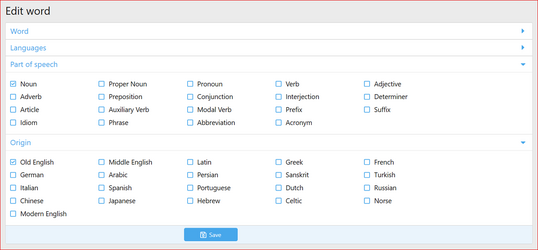 XenCustomize-Word-Meanings-205-Edit-word-Parts-of-speech-Origins.png97.1 KB · Views: 34
 -
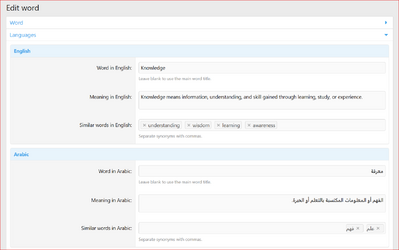 XenCustomize-Word-Meanings-205-Edit-word-Languages.png122.6 KB · Views: 36
 -
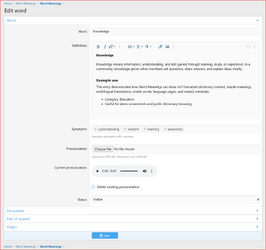 XenCustomize-Word-Meanings-205-Edit-word.png230.1 KB · Views: 36
 -
 XenCustomize-Word-Meanings-205-Approval-queue-Word-meaning-suggestion.png141.4 KB · Views: 39
 -
 XenCustomize-Word-Meanings-205-Suggest-an-edit.png139 KB · Views: 36
 -
 XenCustomize-Word-Meanings-205-Record-pronunciation-start.png118.3 KB · Views: 36
 -
 XenCustomize-Word-Meanings-205-Word-Meaning-in-English.png402 KB · Views: 34
 -
 XenCustomize-Word-Meanings-205-Record-pronunciation-save.png127.4 KB · Views: 39
 -
 XenCustomize-Word-Meanings-205-Word-Meaning-in-Japanese.png357.2 KB · Views: 34
 -
 XenCustomize-Word-Meanings-205-Turkish-Dictionary.png363.2 KB · Views: 37
 -
 XenCustomize-Word-Meanings-205-Korean-words-starting-with-letter-Korean-Dictionary.png203.2 KB · Views: 39
 -
 XenCustomize-Word-Meanings-205-ACP-Permissions.png136.1 KB · Views: 36
 -
 XenCustomize-Word-Meanings-205-ACP-Admin-Options.png210.1 KB · Views: 37
 -
 XenCustomize-Word-Meanings-205-ACP-Delete-origin-field.png83.3 KB · Views: 38
 -
 XenCustomize-Word-Meanings-205-ACP-Edit-origin-field.png81.2 KB · Views: 34
 -
 XenCustomize-Word-Meanings-205-ACP-Edit-Parts-of-speech-field.png80.2 KB · Views: 36
 -
 XenCustomize-Word-Meanings-205-ACP-Edit-language-field.png146.9 KB · Views: 32
 -
 XenCustomize-Word-Meanings-205-ACP-Origins.png171.4 KB · Views: 37
 -
 XenCustomize-Word-Meanings-205-ACP-Parts-of-speech.png166.5 KB · Views: 37
 -
 XenCustomize-Word-Meanings-205-ACP-Languages.png209.1 KB · Views: 35


