

A new product by XenCustomize is available: Music Album Threads: Forum & Thread Types 2.0.0 - Adds dedicated music album thread and forum types with album-specific data, album covers, ratings, unique displays, filtering/sorting, SEO, and user listening shelves.
Turn your XenForo forum into the ultimate destination for music lovers with the XenCustomize Music Album Threads add-on!
This powerful tool introduces dedicated thread and forum types designed specifically for music albums, complete with ratings, detailed album information, tracklists, and links to streaming services. The add-on also gives your members the ability to create personalized user libraries, creating a rich, organized, and interactive experience for your community.
Unlike other solutions that rely on external APIs to auto-import albums, this add-on is community-driven. Your members create and enrich album threads with their own knowledge, reviews, and collections. This ensures unique, organic content tailored to your forum, while still giving you all the structure and features of a professional music album catalog.
 Album-Centric Thread & Forum Types – Tailored experience for music album discussions
 Album Cover Image – Supports custom uploads, deletion, and auto-assignment from attachments
 Integrated Rating System – Let users rate albums with seamless, dynamic updates
List & Grid Views – Choose visually engaging views for your album forums
 Detailed Album Data – Store and display rich details like title, artist, release year, formats, genre, tracklist, album links, and more
 Sticky Sidebar – Album cover, rating, and user actions stay visible in the first post
 User Music Libraries – Organize albums as Want to Listen, Listening, or Listened
 Community Library Stats – See how many users want, are listening to, or have listened to each album
 Community-Driven, Not API-Dependent – Albums are created and maintained by you and your users
 Advanced Filtering & Sorting – Filter and sort by artist, release year, rating, format, etc.
 Consistent Album Display Across the Platform – Covers, ratings and links shown where they matter
 SEO Friendly – Includes Schema.org LD+JSON structured data for better discoverability
Store and showcase key album information:
Covers and ratings are visible in:
With XenCustomize Music Album Threads, you’ll build an engaging, structured, and visually stunning album hub where your music-loving community doesn’t just consume — they contribute, share, and thrive!
 XenForo 2.3.x
  XenForo 2.2.x
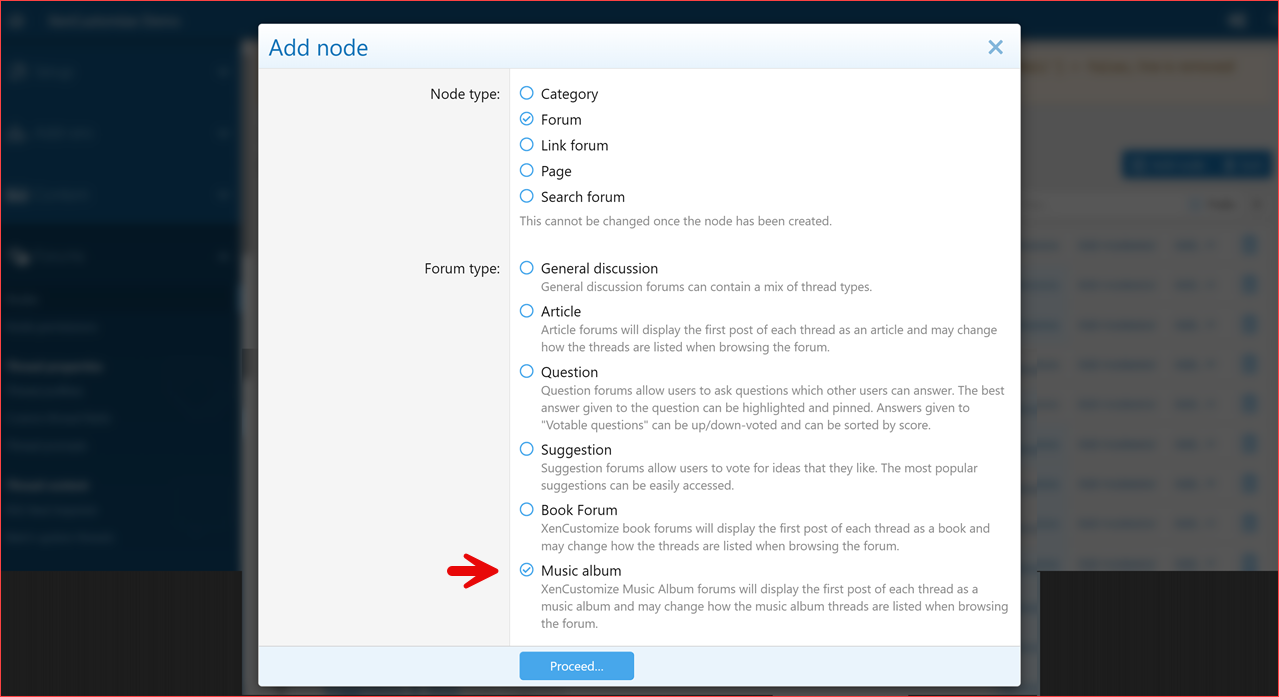
 Add Album Forum Type

Album Forum: Display styles (List & Grid)
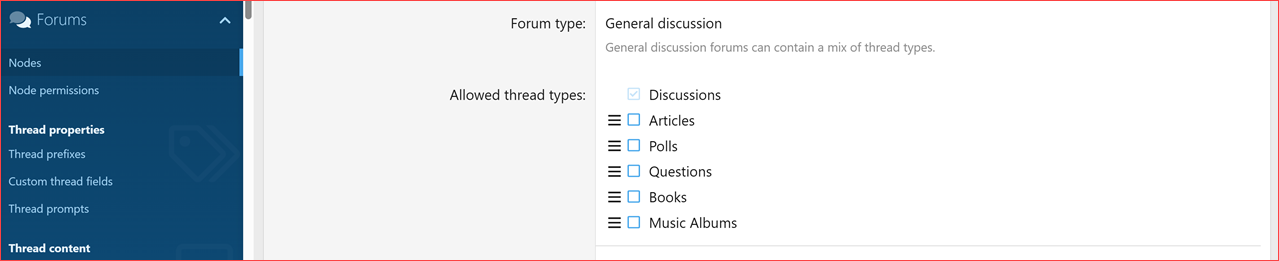
Add/Edit Forum: Allowed Thread Types – Albums

Nodes – Album Forum
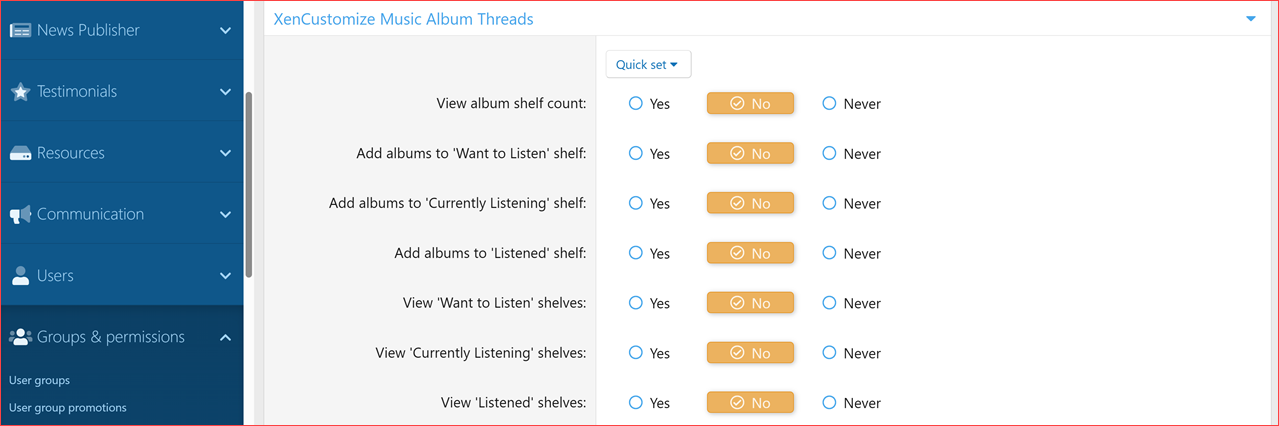
User Group Permissions
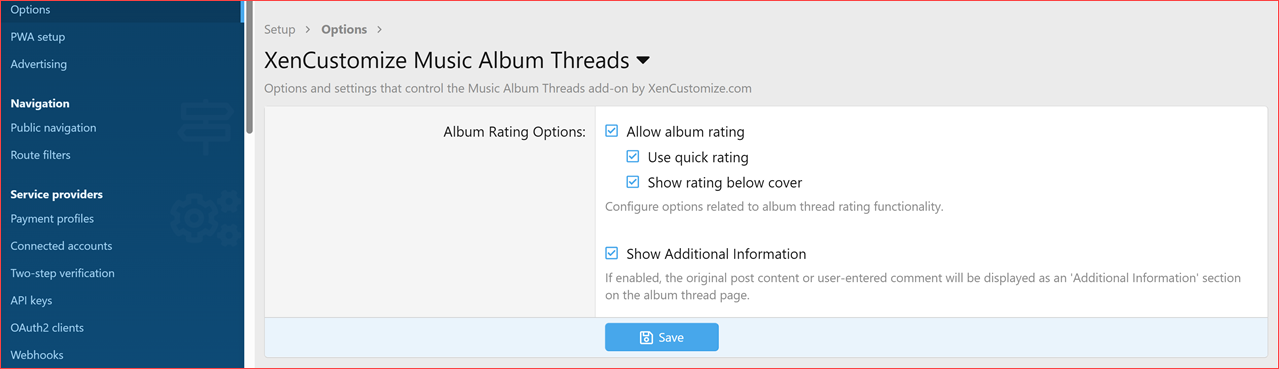
Admin Options
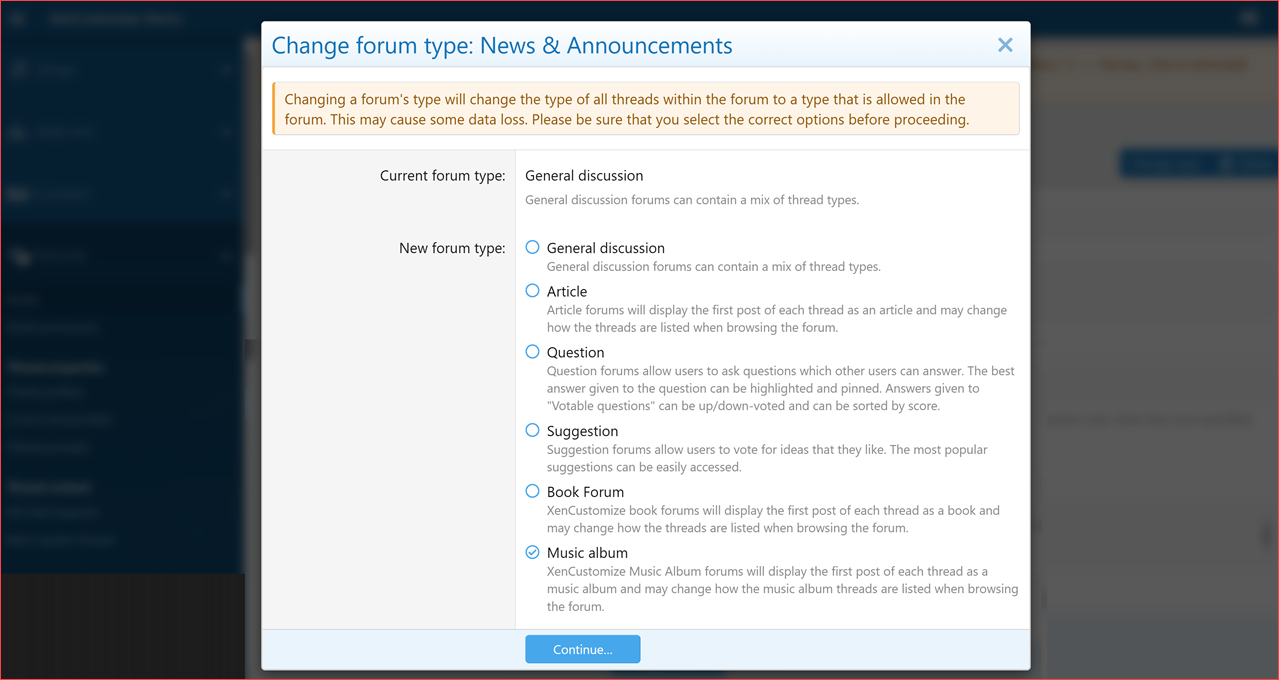
Change Forum Type – Music Album
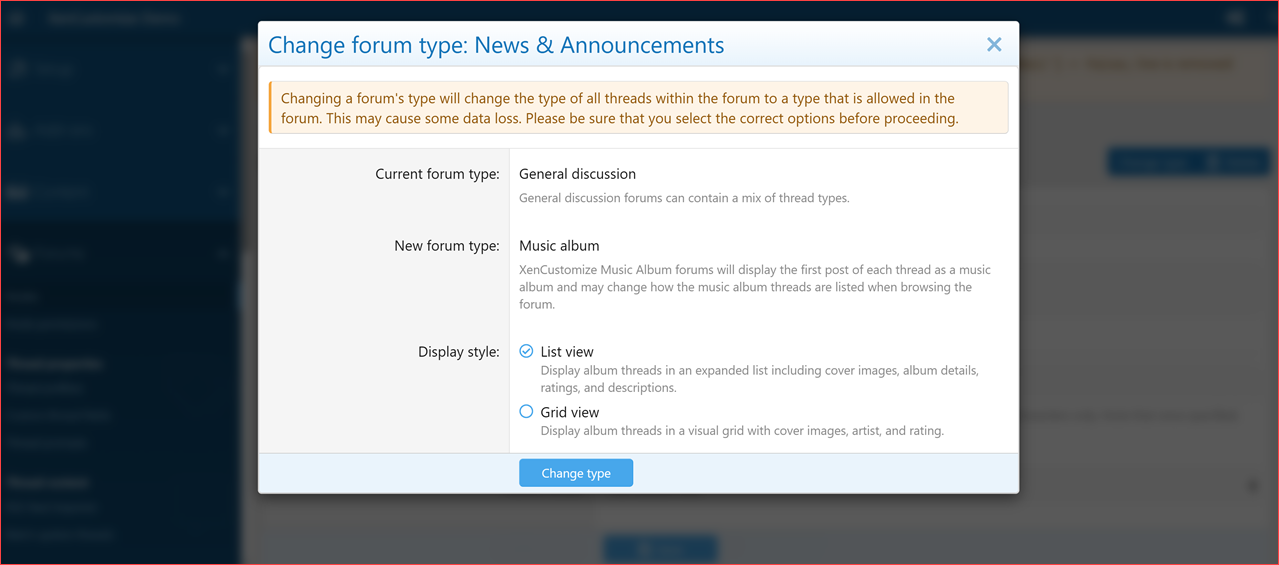
Change Forum Type - Music Album - Display Style (List view & Grid view)

Forum List – Music Album Forum
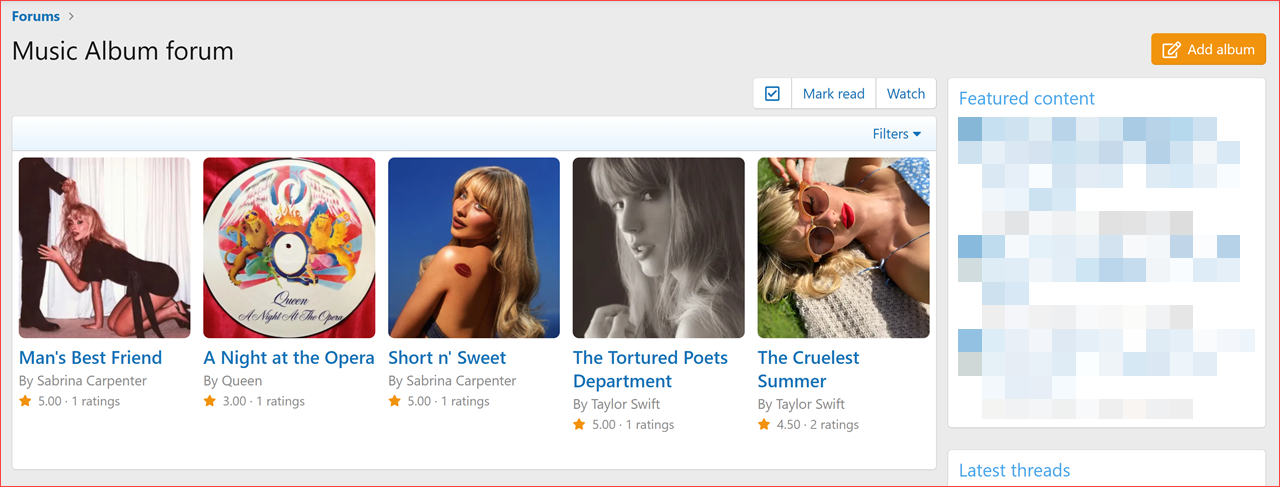
Music Album Forum – Grid View
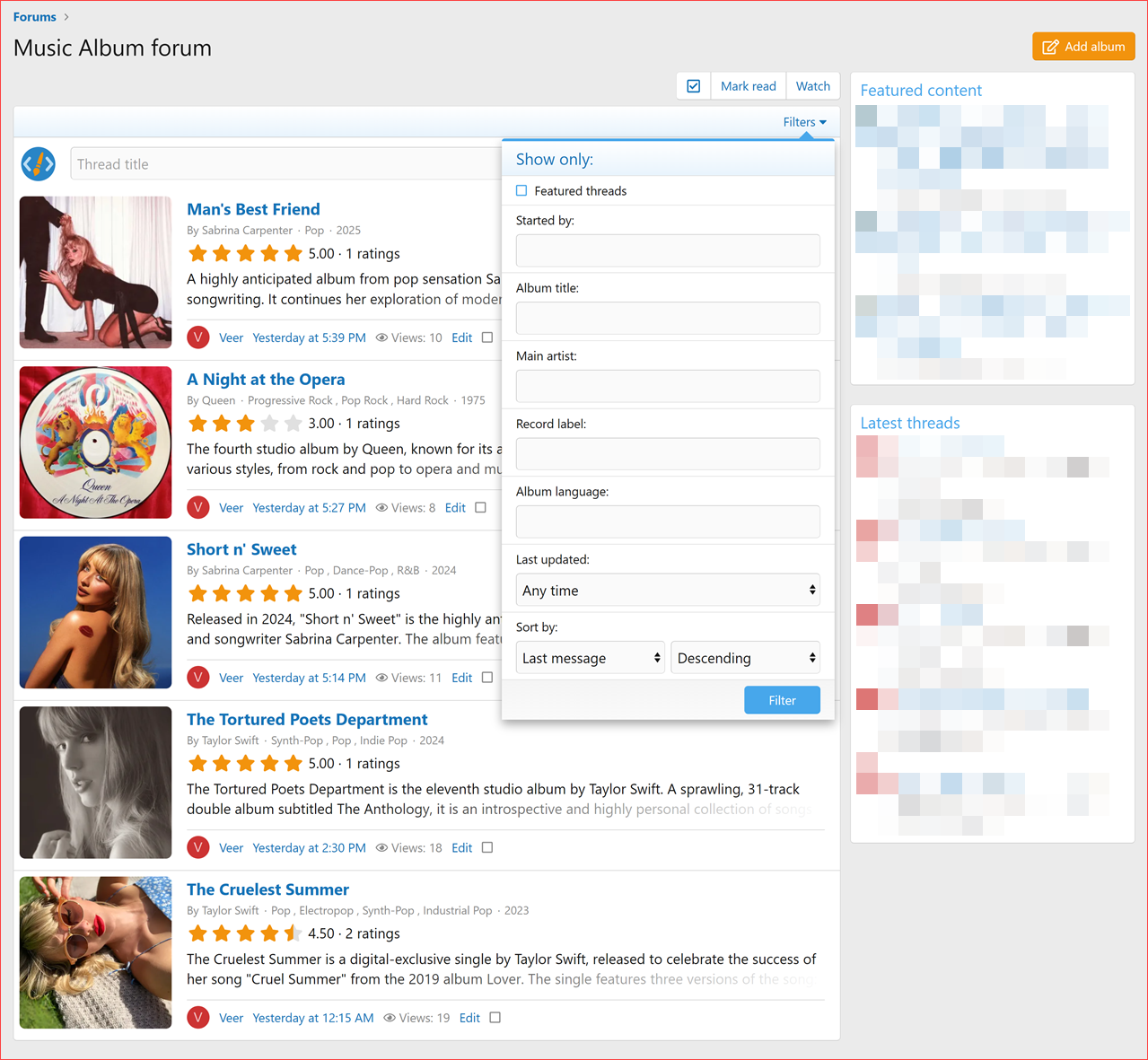
Music Album Forum – List View and Filter menu
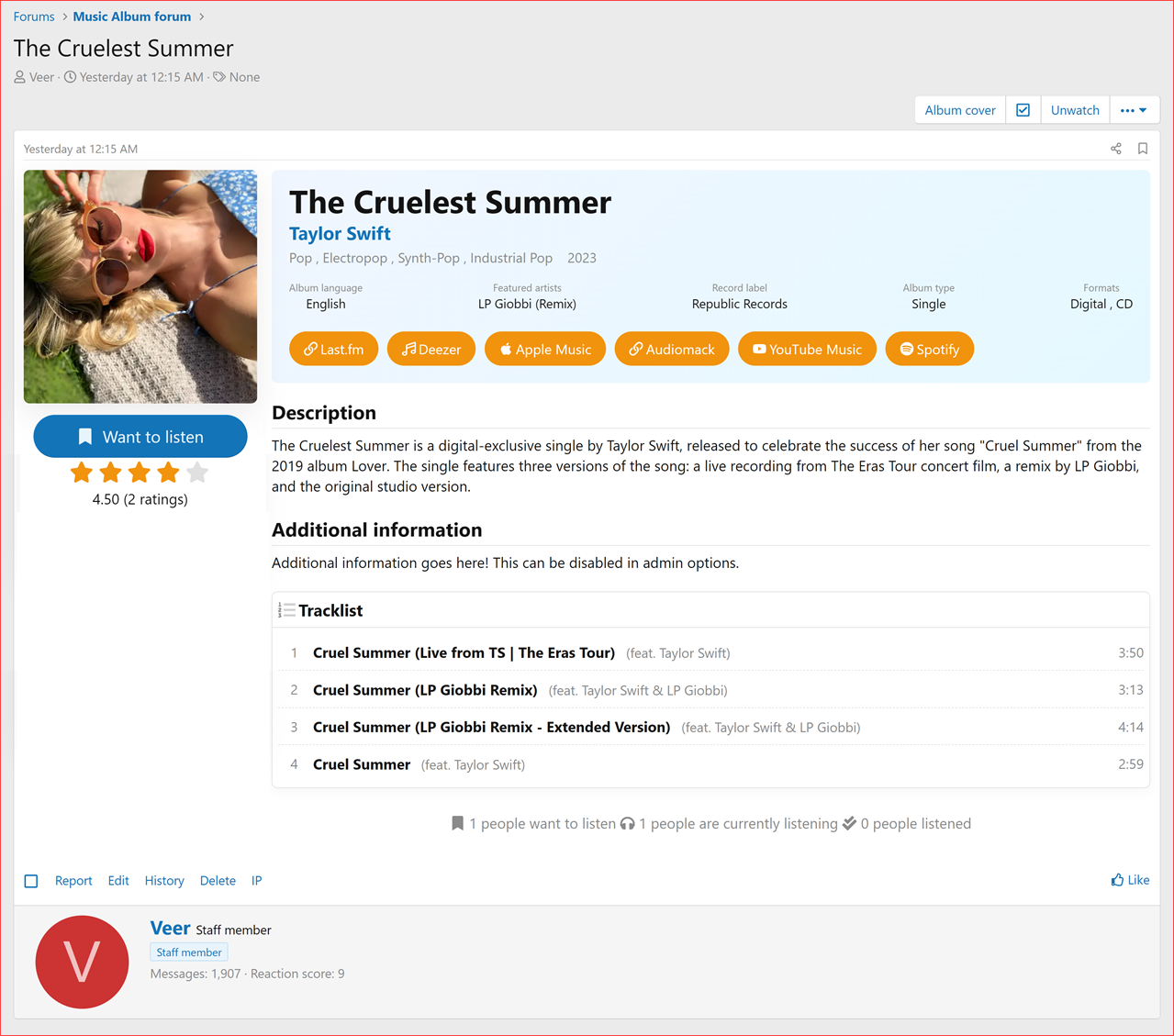
Music Album Thread View (showing album cover, rating, tracklist, album links, and album details)
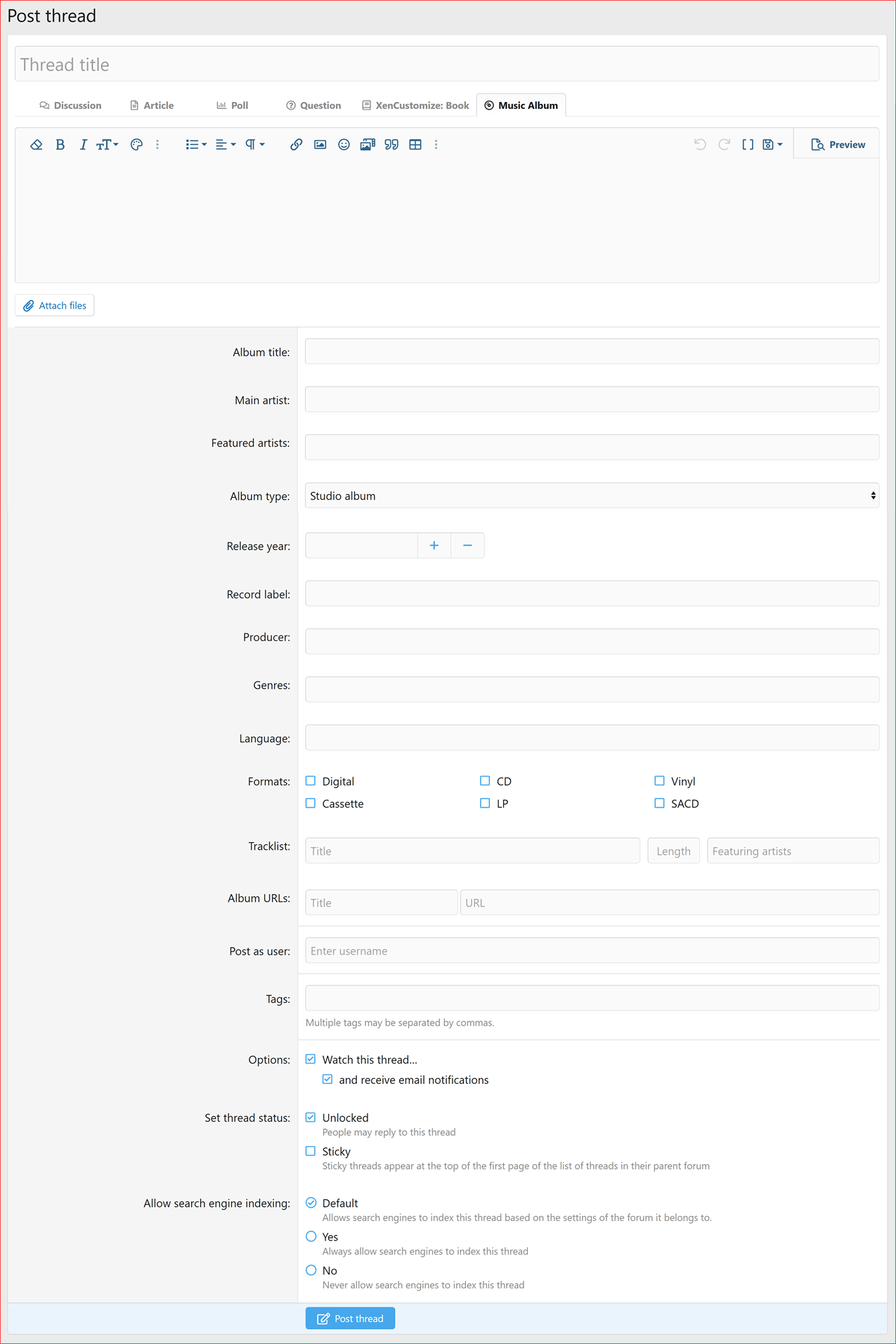
Add Music Album Thread (creation form with tracklist, album URLs and other album data)
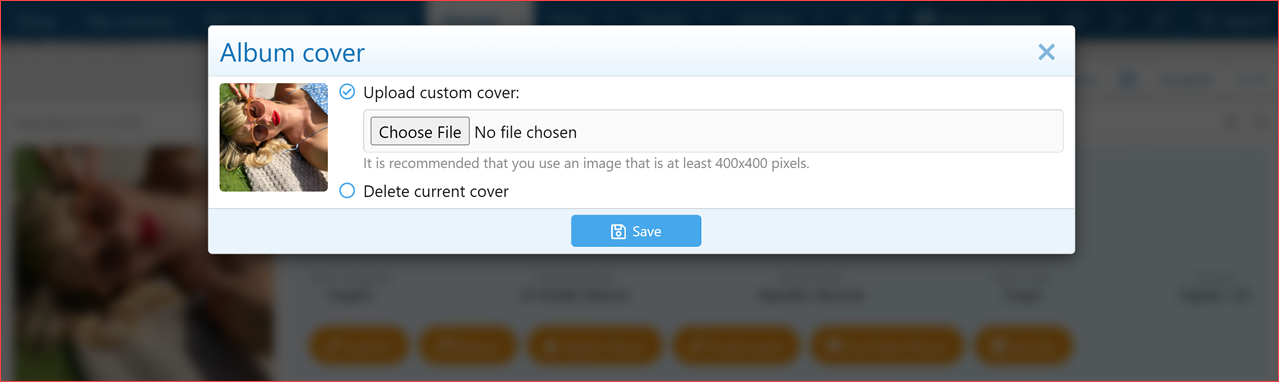
Music Album Thread – Upload/Delete Album Cover
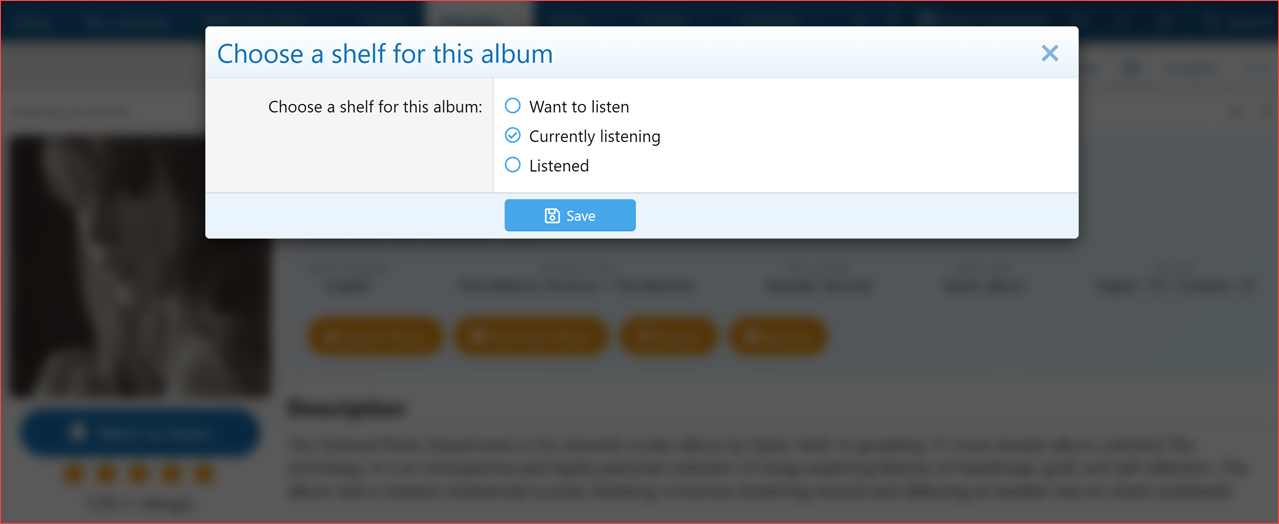
Music Album Thread – Choose a Shelf for this Album
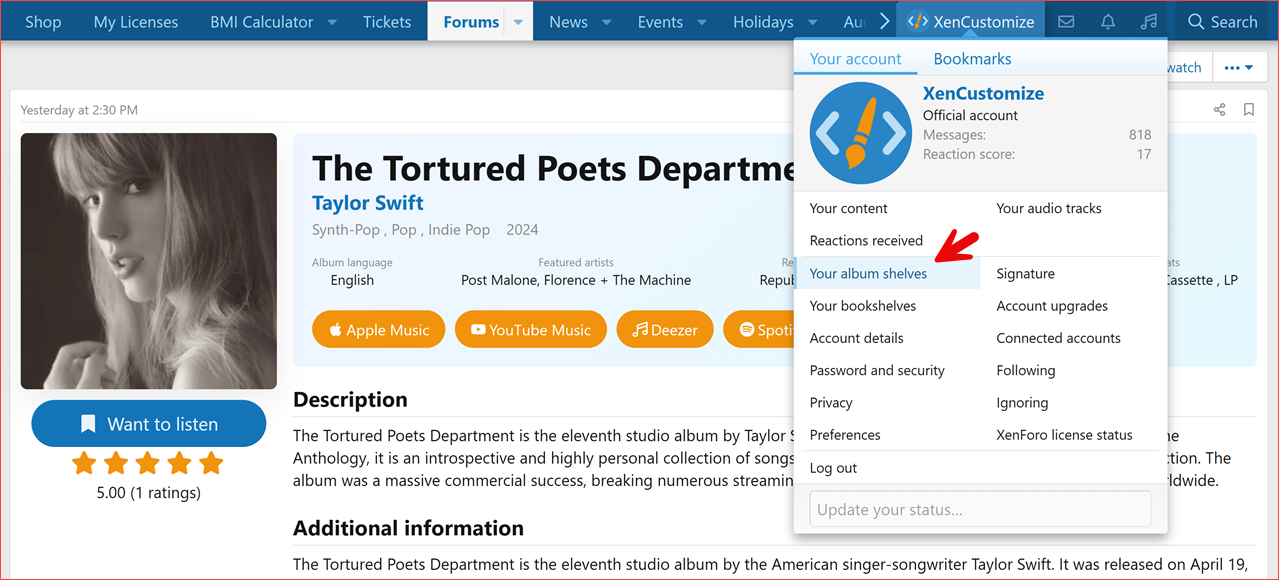
Your Account - Your Music Album Shelves
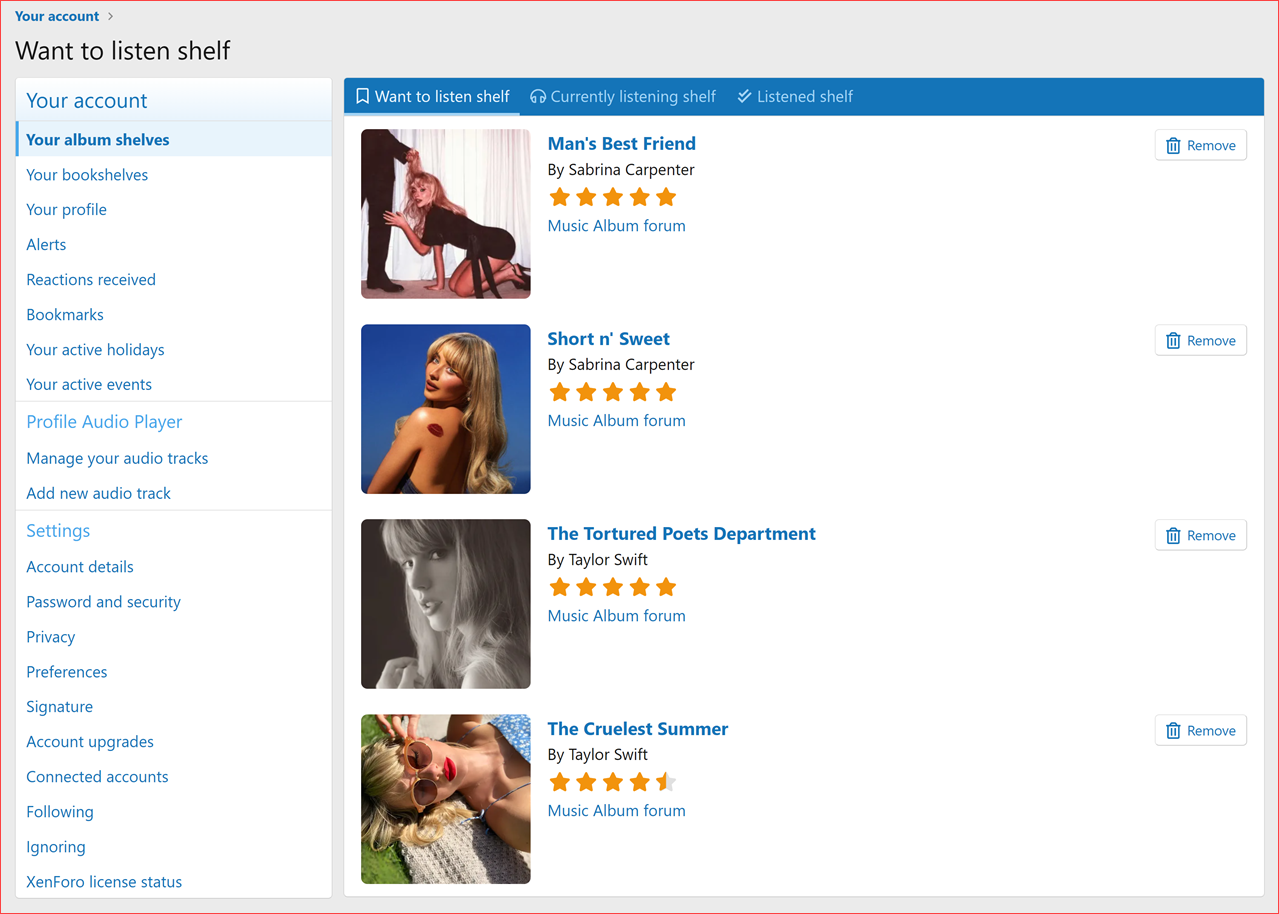
Your Account – Your Album Shelves (Want to Listen / Currently Listening / Listened shelves)
 Install Add-on:
 Configuration:
 Permissions:
 Creating a Book Thread:
 Adding Books to Shelves:
 Filtering and Sorting Book Forums:
 Forum View Display Styles:
 Support:
 Licensing:
Read more about this product...
 XenCustomize Music Album Threads for XenForo 2
Turn your XenForo forum into the ultimate destination for music lovers with the XenCustomize Music Album Threads add-on!This powerful tool introduces dedicated thread and forum types designed specifically for music albums, complete with ratings, detailed album information, tracklists, and links to streaming services. The add-on also gives your members the ability to create personalized user libraries, creating a rich, organized, and interactive experience for your community.
Unlike other solutions that rely on external APIs to auto-import albums, this add-on is community-driven. Your members create and enrich album threads with their own knowledge, reviews, and collections. This ensures unique, organic content tailored to your forum, while still giving you all the structure and features of a professional music album catalog.
 Key Highlights
Album-Centric Thread & Forum Types – Tailored experience for music album discussions Album Cover Image – Supports custom uploads, deletion, and auto-assignment from attachments Integrated Rating System – Let users rate albums with seamless, dynamic updates List & Grid Views – Choose visually engaging views for your album forums Detailed Album Data – Store and display rich details like title, artist, release year, formats, genre, tracklist, album links, and more Sticky Sidebar – Album cover, rating, and user actions stay visible in the first post User Music Libraries – Organize albums as Want to Listen, Listening, or Listened Community Library Stats – See how many users want, are listening to, or have listened to each album Community-Driven, Not API-Dependent – Albums are created and maintained by you and your users Advanced Filtering & Sorting – Filter and sort by artist, release year, rating, format, etc. Consistent Album Display Across the Platform – Covers, ratings and links shown where they matter SEO Friendly – Includes Schema.org LD+JSON structured data for better discoverability Notable Features:
Dedicated Album Types & Structure
- Dedicated Album Thread Type: Introduces a unique thread type designed for album rating and discussion, with structured album-specific fields.
- Dedicated Album Forum Type: Establishes a specific forum type for organizing album discussions, providing a focused hub for music communities.
- Automatic Data Preparation: Converting an existing forum into an "Album Forum" prepares its threads with album-specific data.
- Data Cleanup: Switching back to other forum types cleans album data automatically.
- Flexible Forum Type Conversion: Seamlessly convert any discussion, article, question, or suggestion forum into an Album Forum.
Community-Driven Content
- Music Albums are added and curated directly by your members, not pulled from external APIs.
- This avoids duplicate, cookie-cutter content and instead creates unique discussions specific to your community.
- Members can enrich threads with their own tracklists, covers, streaming links, and reviews.
- Keeps your forum independent — no risk of API shutdowns or licensing changes.
Album Rating System
- Users can rate albums directly from the thread view (1–5 stars).
- Display average rating and rating counts in forum lists, grids, search results, and thread view.
- Supports quick rating without page reload.
- Ratings dynamically update when users add or remove ratings.
- Admins can enable/disable ratings, configure quick rating, and control rating placement.
- Ratings are securely stored with user, value, and date information.
 Rich Album Data & Thread Display
Store and showcase key album information:- Album Title
- Album Artist(s)
- Release Year
- Genre(s)
- Formats (Digital, CD, Vinyl, Cassette, LP, SACD)
- Tracklist — Title, Length, Featuring artists
- Album URLs — Platform links & buttons (Spotify, Apple Music, Bandcamp, YouTube, Tidal, Discogs, etc.)
- Record Label / Publisher
- Album Rating & Rating Count
- Album Cover Image
- Additional Album Description
Album Cover Image Management
- Upload custom album covers (GIF, JPEG, PNG, WebP supported).
- Easily delete or replace covers.
- Recommended dimensions: 500x500 pixels.
- Auto-detects and sets first-post attachments as album covers when moved into an album forum.
Consistent Album Display Across the Platform
Covers and ratings are visible in:- Album Thread View
- Album Forum (List & Grid Views)
- Search Results
- User Music Libraries
Unique Album Thread View Design
- Sticky sidebar with album cover, rating, and library button.
- Enhanced album info block for key details at a glance.
- Track lists and formats elegantly displayed in first post.
Unique Forum Display Style & Browse
- List View: Rich detail display — cover, artist, release year, formats, rating, and summary.
- Grid View: Visual browsing — cover, artist, rating for quick scanning.
- Filtering: Filter by Artist, Release Year, Genre, Format.
- Sorting: Sort by Artist, Release Year, Rating, or Recently Added.
 Personalized User Experience & Management
- User Music Libraries:
- Want to Listen – Albums users are interested in.
- Listening – Albums users are currently playing.
- Listened – Albums users have finished exploring.
- Community Library Stats: “X people want to listen,” “X people are listening,” “X people listened.”
- Integrated Album Creation Form: Simple interface for entering album details during thread creation.
- Dedicated Post Button: Clear “Add Album” button for starting new album discussions.
 Integrations & Administration
- Schema.org LD+JSON: SEO-ready structured data for albums.
- Full XenForo Feature Support:
- Thread Prefixes
- Custom Thread Fields
- Thread Prompts
- Permissions: Fine-grained control for which user groups can use album features.
With XenCustomize Music Album Threads, you’ll build an engaging, structured, and visually stunning album hub where your music-loving community doesn’t just consume — they contribute, share, and thrive!
 Compatible XF Versions
XenForo 2.3.x XenForo 2.2.x Screenshots
Add Album Forum Type Album Forum: Display styles (List & Grid) Add/Edit Forum: Allowed Thread Types – Albums Nodes – Album Forum User Group Permissions Admin Options Change Forum Type – Music Album Change Forum Type - Music Album - Display Style (List view & Grid view) Forum List – Music Album Forum Music Album Forum – Grid View Music Album Forum – List View and Filter menu Music Album Thread View (showing album cover, rating, tracklist, album links, and album details) Add Music Album Thread (creation form with tracklist, album URLs and other album data) Music Album Thread – Upload/Delete Album Cover Music Album Thread – Choose a Shelf for this Album Your Account - Your Music Album Shelves Your Account – Your Album Shelves (Want to Listen / Currently Listening / Listened shelves) Installation and Usage Instructions:
Install Add-on:- In your XenForo Admin CP, go to "Add-ons" and click "+ Install/upgrade from archive". Select the downloaded add-on archive file and click "Install".
Configuration:- After installation, navigate to "Options" in the Admin CP and find "XenCustomize Book Threads" to adjust any available settings to your preferences.
Permissions:- Review and configure user group permissions under "Groups & Permissions" -> "User Group Permissions" -> [Edit Each User Group] -> "XenCustomize Book Threads". This allows you to control who can view and use the shelving features.
Creating a Book Thread:- In a designated "Book Forum," click the "Add Book" button.
- You will be presented with a form to enter the book details (Title, Author, Synopsis, etc.). Fill out the form as required and click "Add book".
- Click "Book cover" button to Upload custom book cover.
Adding Books to Shelves:- When viewing a book thread, you'll see an "Add to shelf" button in the left sidebar.
- Clicking this button will present you with options: "Want to Read," "Currently Reading," and "Read."
- Select the shelf you want to add the book to. Your choice will be saved, and the button's status will update to reflect the current shelf.
- You can manage your personal bookshelves through your account "Your bookshelves" page.
Filtering and Sorting Book Forums:- Within a "Book Forum," look for Filters dropdown menu that allow you to filter the book list by attributes such as Book Title, Author, Publisher, and Language.
- You'll also find options to sort the book list by criteria like Author, Publication Date, and Rating, helping you find books based on your preferences.
Forum View Display Styles:- Administrators can customize the look of each Book Forum by navigating to Admin CP > Forums > Nodes > Edit [Your Book Forum].
- In the forum settings, you can choose the "Display style" between "List view" and "Grid view".
Support:- For support regarding the XenCustomize Book Threads add-on, please visit our support forums at XenCustomize.com and Create a Ticket.
Licensing:- The license grants you the right to use the add-on on a single XenForo installation.
- By purchasing and using this add-on, you agree to the terms of the license agreement.
Read more about this product...


