

A new product by XenCustomize is available: Media View Analytics 2.0.0 - Adds advanced analytics for XFMG media items, including detailed view trends, audience insights, traffic sources, geography, device/platform breakdowns, and a global dashboard.
 XenCustomize Media View Analytics for XenForo Media Gallery
Deep per-media and global media analytics for XFMG, powered by Content Analytics Core, with practical insight into performance, audience quality, and traffic behavior.
XenCustomize Media View Analytics transforms simple media counters into a full analytics workflow for media items.
It helps you track what is actually performing, where attention comes from, and how behavior changes over time.
While building Year in Review in December 2025, we hit a major limitation in core XenForo Media Gallery: media views are stored as a basic counter only.
No per-view date history.
No reliable source timeline.
No audience-quality history.
No period-based growth tracking.
That made serious media-view analysis impossible.
So we applied the same proven analytics model used in our thread analytics and delivered Media View Analytics, powered by Content Analytics Core, for consistent long-term reliability.
Need analytics for other content types too? XenCustomize offers additional analytics modules built on the same Content Analytics Core, with a consistent UI, filters, charts, and reporting flow.
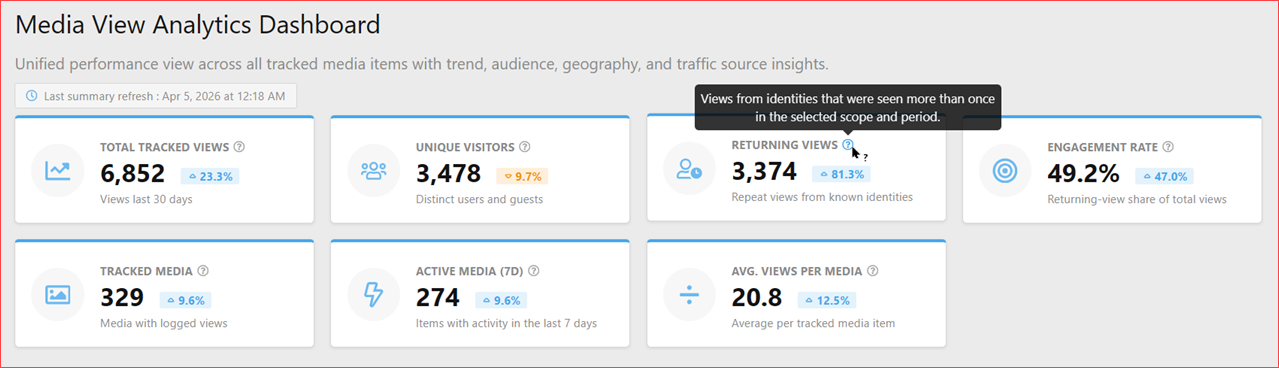
 Dashboard - KPI cards example

Dashboard - View trends example
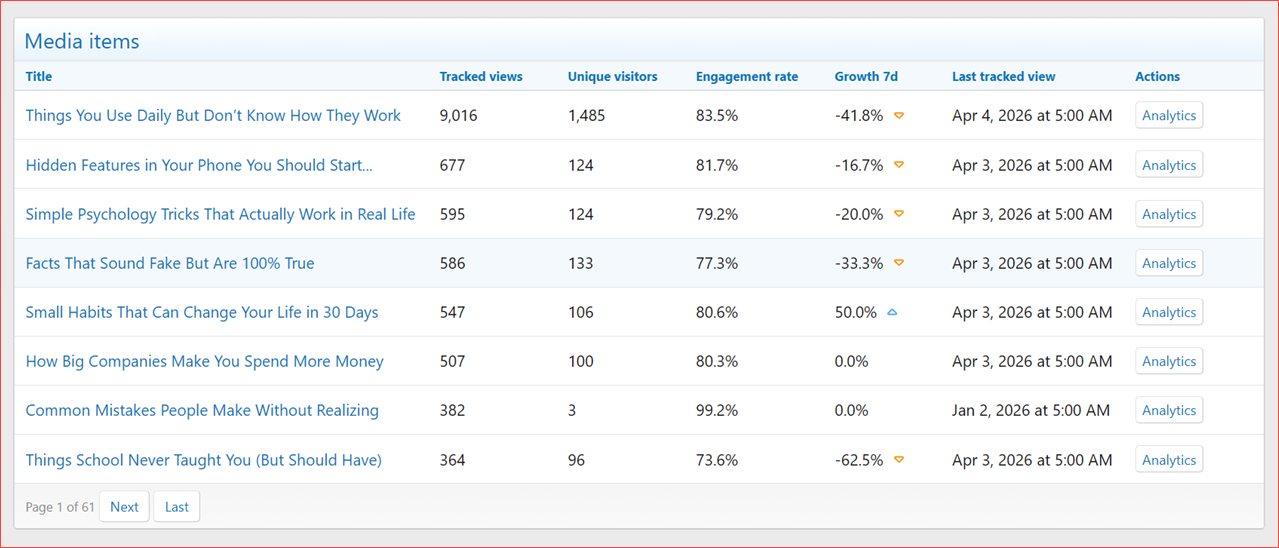
Dashboard - Media items example
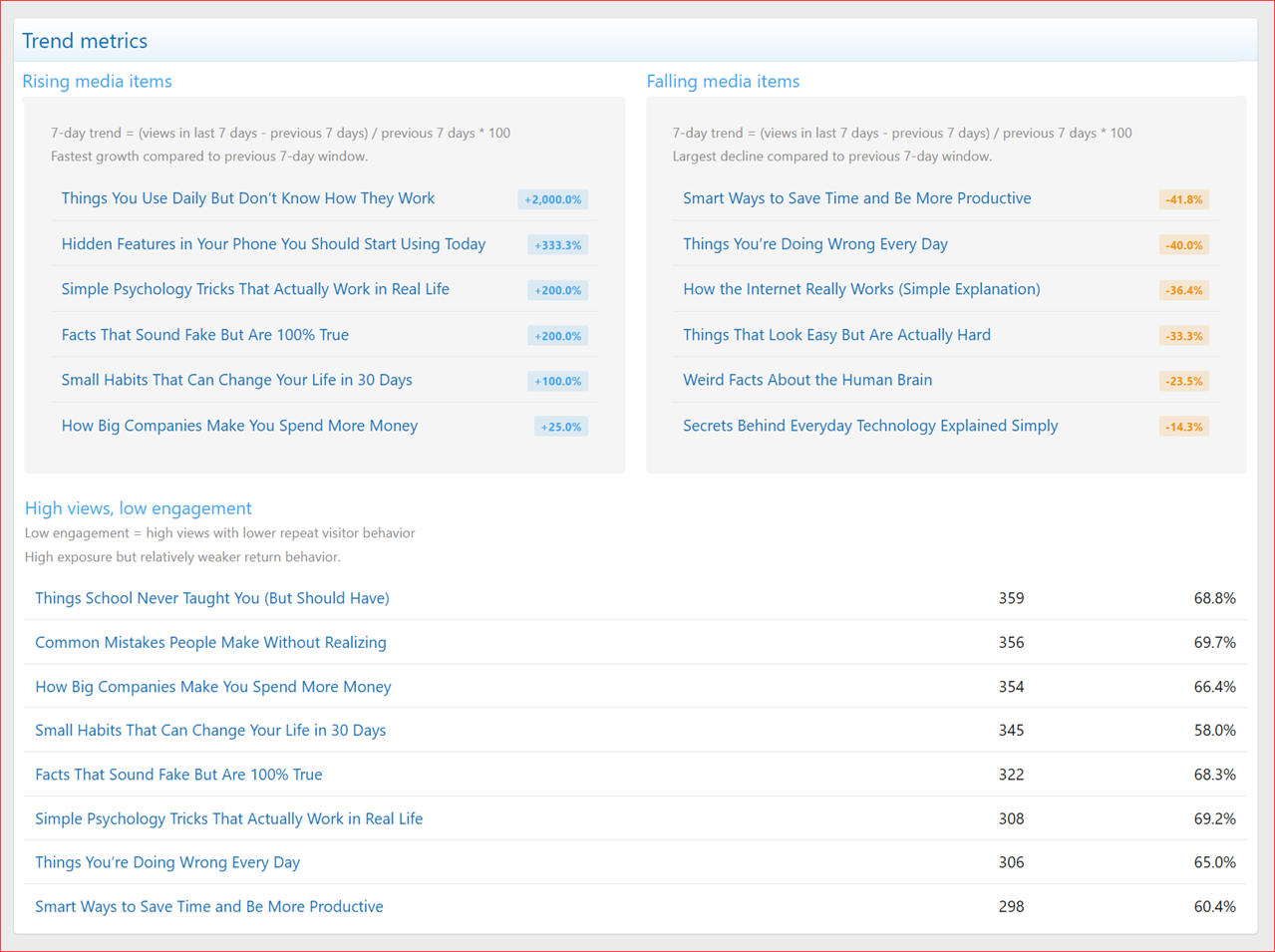
Dashboard - Trend metrics example

Dashboard - Audience breakdown example

Dashboard - Traffic sources example

Dashboard - Geography insights example
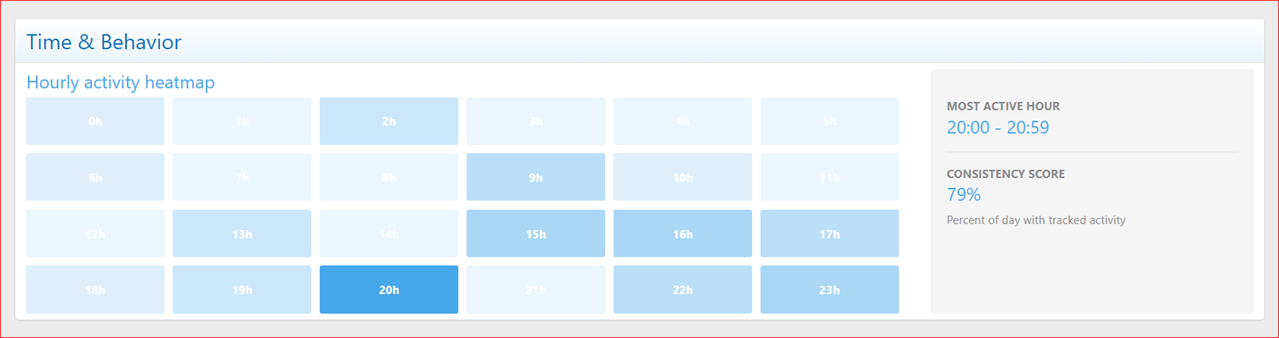
Dashboard - Time & Behavior example

Dashboard - Technology & Platforms example
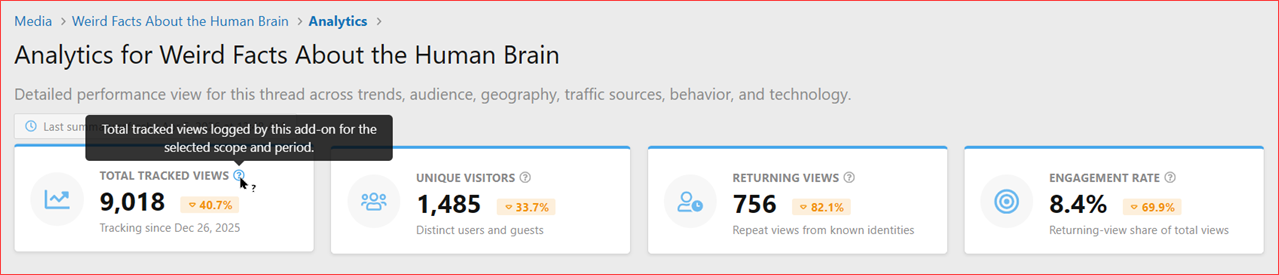
Media-specific Analytics - KPI cards example

Media-specific Analytics - View trends example
Media-specific Analytics - Audience breakdown example

Media-specific Analytics - Geography insights example

Media-specific Analytics - Traffic sources example

Media-specific Analytics - Time & Behavior example
Media-specific Analytics - Technology & Platforms example

Media-specific Analytics - Recent hits preview example

Media-specific Analytics - Recent hits dedicated page - Filters example

Staff bar Analytics menu - Dashboard link example

Media view - Media-specific Analytics link example
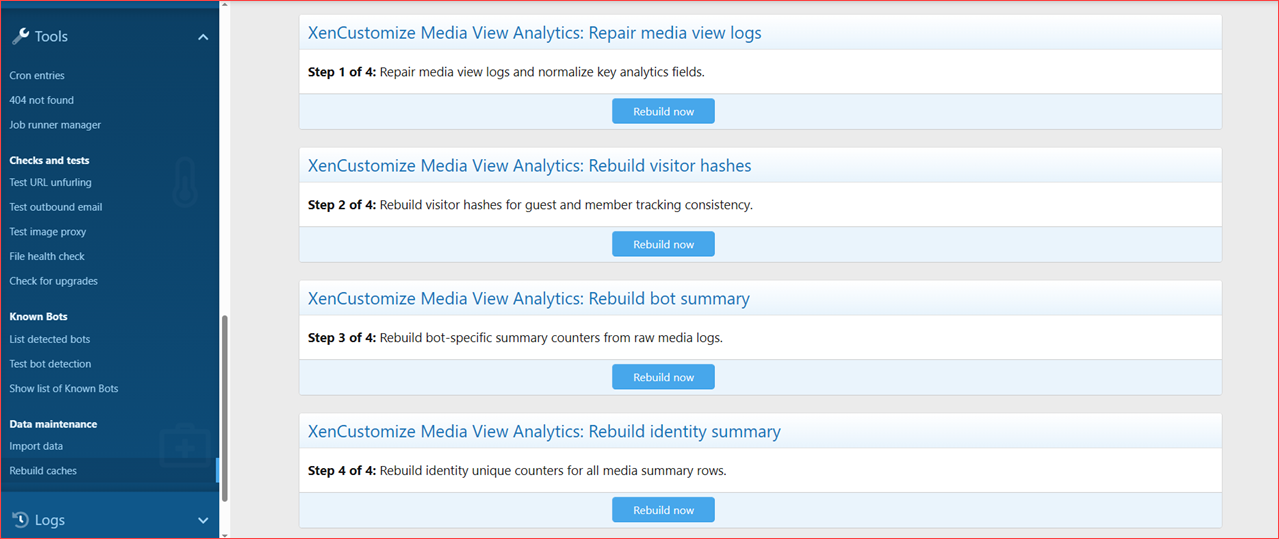
ACP - Rebuild caches example
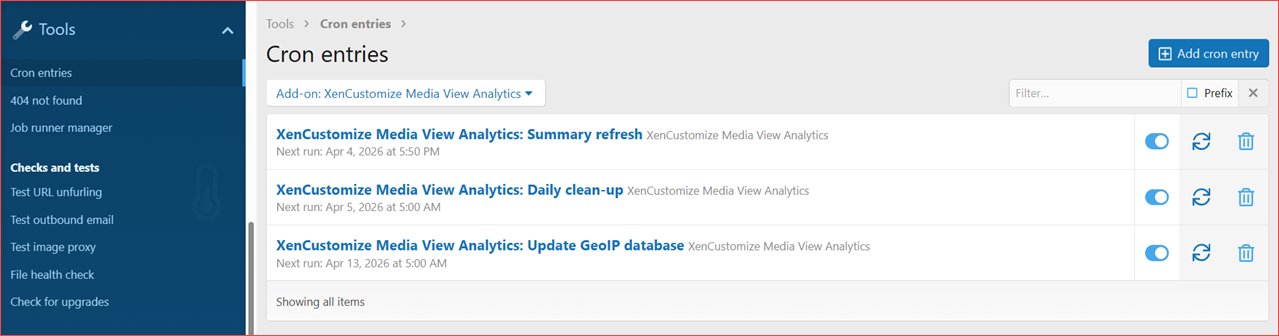
ACP - Rebuild caches example
Get your copy of Media View Analytics 2.0.0 today!
XenCustomize Media View Analytics for XenForo Media GalleryDeep per-media and global media analytics for XFMG, powered by Content Analytics Core, with practical insight into performance, audience quality, and traffic behavior.
XenCustomize Media View Analytics transforms simple media counters into a full analytics workflow for media items.
It helps you track what is actually performing, where attention comes from, and how behavior changes over time.
 Why We Built This
While building Year in Review in December 2025, we hit a major limitation in core XenForo Media Gallery: media views are stored as a basic counter only.No per-view date history.
No reliable source timeline.
No audience-quality history.
No period-based growth tracking.
That made serious media-view analysis impossible.
So we applied the same proven analytics model used in our thread analytics and delivered Media View Analytics, powered by Content Analytics Core, for consistent long-term reliability.
 What This Add-on Does
- Per-media-item analytics pages with deep breakdowns
- Global dashboard for all tracked media items
- Human / Bot / All scope analysis
- Trend and movement visibility over selectable periods
- Recent hits workflow with filters and pagination
 Key Features
 Per-media analytics view
 Global media dashboard
 Smart cards and trend metrics
 Traffic source analysis
 Geography insights
 Time behavior visibility
 Technology platform analytics
 Recent hits with username/IP filters
 Bot-aware analytics scope switching
 Rebuild/repair operations support
 Summary refresh + cleanup + GeoIP update flow
 Complete Feature List
1) Media-Level Analytics
- Dedicated analytics page per media item
- Period filters: 7, 14, 30, 90, last month, last year, all-time
- Scope filters: Human / All / Bots
- Trend chart and metric movement context
- KPI cards: views, uniques, returning, engagement indicators
- Audience section
- Traffic sources + referrer insight
- Geography section
- Time behavior section
- Technology section (browser/OS/device)
- Recent hits table + full recent hits page
2) Global Media Dashboard
- Unified performance view across tracked media items
- Portfolio-level KPI cards
- Trend chart for selected range
- Rising and falling media highlights
- Media performance table with analytics drill-down
- Audience/traffic/geography/time/technology sections
3) Data & Processing Model
- Per-view log records with timestamped data
- Geo/device/browser/OS/referrer capture support
- Bot-aware processing via Core logic
- Traffic channel classification
- Unique handling modes via Core options
4) Maintenance & Admin Tooling
- Summary refresh compatibility jobs
- Daily cleanup/pruning compatibility flow
- GeoIP update trigger compatibility
- Repair logs and rebuild jobs for analytics data consistency
5) UI/Workflow Integration
- Media analytics access integrated in media-view workflow
- Staff bar analytics menu integration
- Consistent chart behavior, placeholders, tooltips, and empty states
 Tracking Exclusions (Core-Powered)
- This add-on inherits Core exclusion controls.
- You can exclude staff users, admin-only users, or specific usernames from tracking.
- Configured in Content Analytics Core options and applied automatically here.
- Forward-only behavior: existing historical analytics data remains unchanged.
 Dependency
- Requires: XenCustomize Content Analytics Core
- This add-on does not run standalone
 Branding-Free License
- This add-on does not include a separate branding-free license.
- Branding-free is managed through XenCustomize Content Analytics Core.
- If you need branding-free for this add-on, purchase the Core Branding-Free License ($50) from the Core product page.
 Requirements
- XenForo 2.2.0+
- XenForo Media Gallery (XFMG)
- XenCustomize Content Analytics Core
Explore More Core-Powered Analytics Modules
Need analytics for other content types too? XenCustomize offers additional analytics modules built on the same Content Analytics Core, with a consistent UI, filters, charts, and reporting flow.- Thread View Analytics for XenForo Threads
- Resource View Analytics for XenForo Resource Manager
- Product View Analytics for DBTech eCommerce
Need Analytics for Another Content Type?
- Need analytics for a custom or currently unsupported content type? Share your requirement in our Suggestions forum.
- We review requests and can add support for additional content types based on demand and technical feasibility.
 Screenshots
Dashboard - KPI cards example Dashboard - View trends example Dashboard - Media items example Dashboard - Trend metrics example Dashboard - Audience breakdown example Dashboard - Traffic sources example Dashboard - Geography insights example Dashboard - Time & Behavior example Dashboard - Technology & Platforms example Media-specific Analytics - KPI cards example Media-specific Analytics - View trends example Media-specific Analytics - Audience breakdown example Media-specific Analytics - Geography insights example Media-specific Analytics - Traffic sources example Media-specific Analytics - Time & Behavior example Media-specific Analytics - Technology & Platforms example Media-specific Analytics - Recent hits preview example Media-specific Analytics - Recent hits dedicated page - Filters example Staff bar Analytics menu - Dashboard link example Media view - Media-specific Analytics link example ACP - Rebuild caches example ACP - Rebuild caches exampleGet your copy of Media View Analytics 2.0.0 today!


