

A new product by XenCustomize is available: Thread View Analytics 2.0.0 - Thread-level and global analytics for XenForo threads with traffic sources, engagement, geography, technology insights, and admin rebuild tools.
 XenCustomize Thread View Analytics for XenForo 2
Thread-level and global analytics for XenForo threads, powered by Content Analytics Core, built for real operational insight rather than a single counter.
XenCustomize Thread View Analytics turns XenForo’s basic thread view counter into a complete analytics workflow for threads.
Track who is viewing, when they view, where traffic comes from, how engagement changes, and which threads are rising or falling, with thread-level drill-down plus a global tracked-threads dashboard.
Built for real admin workflows, it also includes summary refresh, cleanup, and rebuild operations for long-term reliability.
In December 2025, while building XenCustomize Year in Review, we hit a major limitation in core XenForo: thread views are stored as a basic counter only.
No per-view date history.
No source breakdown.
No audience insight.
No growth tracking by period.
That made serious thread-view analysis impossible.
So we built Thread View Analytics, then evolved the shared architecture into Content Analytics Core to keep analytics reliable and maintainable long-term.
We did not rush-release it. Instead, we ran it internally for more than 4 months on real communities, including our own official support forum. Now on release, it is stable, polished, and production-tested.
XenCustomize Thread View Analytics gives you:
Need analytics for other content types too? XenCustomize offers additional analytics modules built on the same Content Analytics Core, with a consistent UI, filters, charts, and reporting flow.
See attachments.
Get your copy of Thread View Analytics 2.0.0 today!
XenCustomize Thread View Analytics for XenForo 2Thread-level and global analytics for XenForo threads, powered by Content Analytics Core, built for real operational insight rather than a single counter.
XenCustomize Thread View Analytics turns XenForo’s basic thread view counter into a complete analytics workflow for threads.
Track who is viewing, when they view, where traffic comes from, how engagement changes, and which threads are rising or falling, with thread-level drill-down plus a global tracked-threads dashboard.
Built for real admin workflows, it also includes summary refresh, cleanup, and rebuild operations for long-term reliability.
 Why We Built This
In December 2025, while building XenCustomize Year in Review, we hit a major limitation in core XenForo: thread views are stored as a basic counter only.No per-view date history.
No source breakdown.
No audience insight.
No growth tracking by period.
That made serious thread-view analysis impossible.
So we built Thread View Analytics, then evolved the shared architecture into Content Analytics Core to keep analytics reliable and maintainable long-term.
We did not rush-release it. Instead, we ran it internally for more than 4 months on real communities, including our own official support forum. Now on release, it is stable, polished, and production-tested.
 What This Add-on Does
XenCustomize Thread View Analytics gives you:- Per-thread analytics pages with deep breakdowns
- A global dashboard for all tracked threads (not whole-site analytics)
- Human / Bot / All traffic scope analysis
- Historical trend and growth insights from your own logged data
- Operational tools to rebuild/repair analytics safely
 Key Features
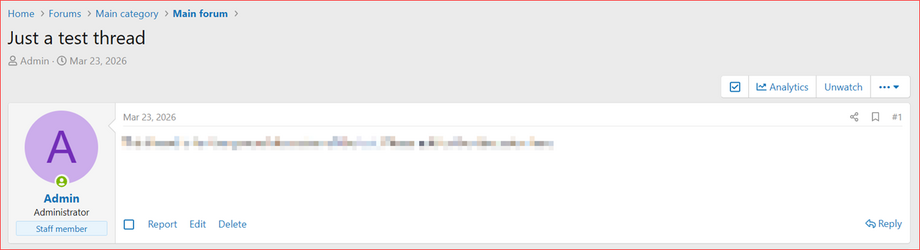
 Thread Analytics View (inside thread tools)
 Global Threads Dashboard for board-wide thread performance
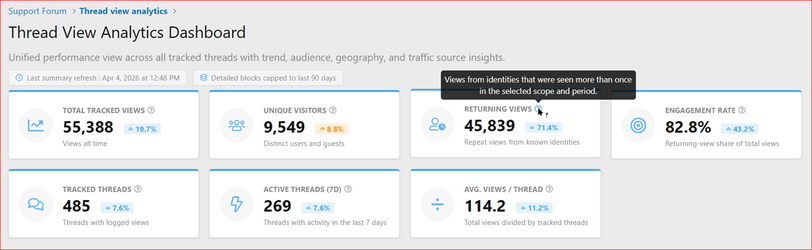
 Smart metrics: total views, uniques, returning views, engagement rate
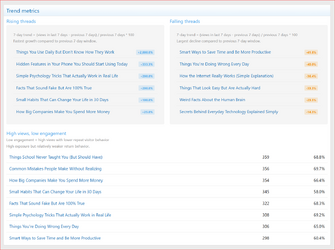
 Growth tracking: last 7 days vs previous 7 days
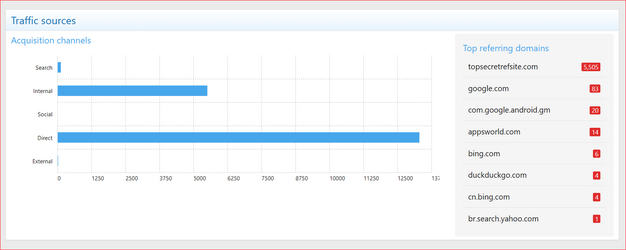
 Traffic sources: Search, Internal, Social, Direct, External
 Geography insights: countries, cities, top locations
 Technology insights: browser, OS, and device breakdown
 Time behavior: hourly activity heatmap + consistency score
 Recent Hits log with username/IP filtering and pagination
 Bot-aware analytics with scope switching
 Admin rebuild toolkit
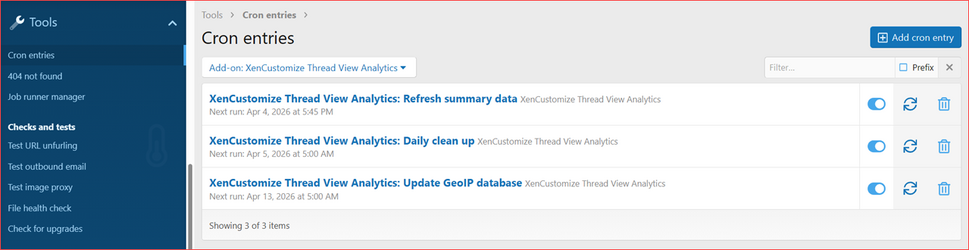
 Auto maintenance: summary refresh, cleanup, GeoIP update support
 Complete Feature List
1) Thread-Level Analytics
- Dedicated analytics page per thread
- Period filters: 7, 14, 30, 90, last month, last year, all-time
- Scope filters: Human / All / Bots (configurable)
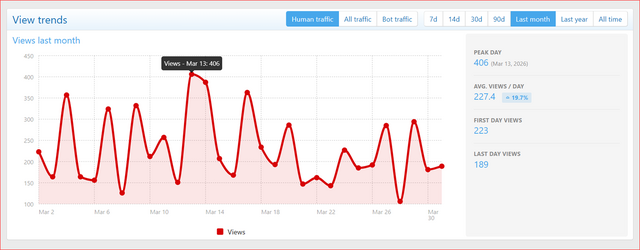
- Trend chart with AJAX refresh
- KPI cards: total tracked views, unique visitors, returning views, engagement rate
- Growth indicators on key metrics
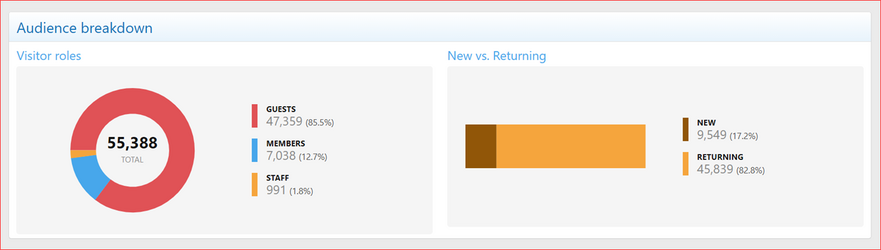
- Audience split: Guests, Members, Staff
- Geography: top countries, top cities, reached locations
- Traffic source breakdown + top referrers
- Hourly behavior insights + consistency indication
- Technology blocks: browser, OS, device
- Recent hits table + full hits page
- Recent hits filters by username and IP
2) Global Threads Dashboard
- Unified performance view across all tracked threads
- Global KPI cards: total views, uniques, returning, engagement, tracked threads, active threads, average views
- Views-over-time trend chart
- Rising threads
- Falling threads
- Thread performance table with direct analytics drill-down
- Audience, traffic, geography, behavior, and technology sections
3) Data Collection & Intelligence
- Logs each thread view with timestamped records
- Stores geo, device, browser, OS, and referrer data
- Uses bot detection with bot-safe analytics handling
- Classifies traffic channels automatically
- Supports unique visitor modes: identity-based and IP-based
- Guest fingerprint strictness support
4) Performance Architecture
- Hybrid data model: raw logs table + daily summary table
- Chunked summary refresh jobs with limits
- Stale-data queue refresh support
- Performance-safe behavior for detail-heavy all-time analysis
5) Admin Controls & Maintenance
- Core-powered analytics options for scope, uniqueness, pruning, refresh, batching, and internal traffic exclusions (staff/admin/specific usernames)
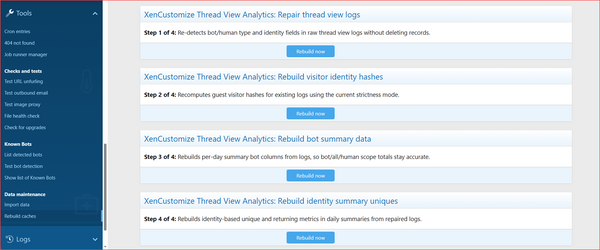
- Admin rebuild jobs: repair logs, rebuild visitor hashes, rebuild bot summary, rebuild identity summary
- Cron flow: summary refresh trigger, daily cleanup, GeoIP update trigger
6) UI/Navigation Integration
- Analytics menu in Staff Bar
- Thread analytics access in thread tools
- Global dashboard route and drill-down workflow
- Core-consistent tooltip/subtext/empty-state/chart behavior
 Tracking Exclusions (Core-Powered)
- This add-on inherits Core exclusion controls.
- You can exclude staff users, admin-only users, or specific usernames from tracking.
- Configured in Content Analytics Core options and applied automatically here.
- Forward-only behavior: existing historical analytics data remains unchanged.
 Perfect For
- Communities that want to know which threads are truly growing
- Teams tracking engagement quality, not only raw views
- Forums needing bot-vs-human visibility
- Admins preparing monthly/quarterly/yearly reporting
- Sites using XenCustomize Year in Review and wanting stronger thread-view data
 Dependency
- Requires: XenCustomize Content Analytics Core.
- This add-on does not run standalone
 Branding-Free License
- This add-on does not include a separate branding-free license.
- Branding-free is managed through XenCustomize Content Analytics Core.
- If you need branding-free for this add-on, purchase the Core Branding-Free License ($50) from the Core product page.
 Requirements
- XenForo 2.2.0+
- XenCustomize Content Analytics Core
- PHP compatible with your XenForo environment
- MaxMind GeoLite license key (optional, recommended for best geo detail)
 Notes
Notes
- Analytics access is admin-focused
- This product analyzes thread views, not all site pages/content types
- For best long-term accuracy, keep summary and rebuild jobs healthy
Explore More Core-Powered Analytics Modules
Need analytics for other content types too? XenCustomize offers additional analytics modules built on the same Content Analytics Core, with a consistent UI, filters, charts, and reporting flow.- Media View Analytics for XenForo Media Gallery
- Resource View Analytics for XenForo Resource Manager
- Product View Analytics for DBTech eCommerce
Need Analytics for Another Content Type?
- Need analytics for a custom or currently unsupported content type? Share your requirement in our Suggestions forum.
- We review requests and can add support for additional content types based on demand and technical feasibility.
 Screenshots
See attachments.Get your copy of Thread View Analytics 2.0.0 today!
Attachments
-
 XenCustomize-Thread-View-Analytics-200-Cron-entries.png144.2 KB · Views: 131
 -
 XenCustomize-Thread-View-Analytics-200-Rebuild-caches.png228.6 KB · Views: 136
 -
 XenCustomize-Thread-View-Analytics-200-Staff-Bar-Analytics-Menu.png64.9 KB · Views: 126
 -
 XenCustomize-Thread-View-Analytics-200-Summary-Refresh-Queued.png71.8 KB · Views: 76
 -
 XenCustomize-Thread-View-Analytics-200-Thread-Analytics-Button.png57.7 KB · Views: 136
 -
 XenCustomize-Thread-View-Analytics-200-Dashboard-Audience-Breakdown.png65.4 KB · Views: 186
 -
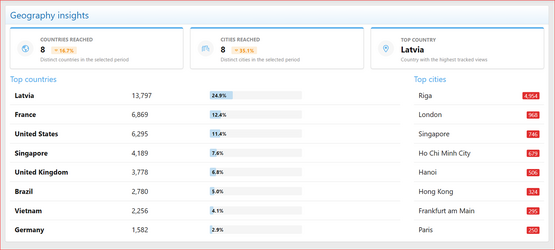 XenCustomize-Thread-View-Analytics-200-Dashboard-Geography-Insights.png115.8 KB · Views: 180
 -
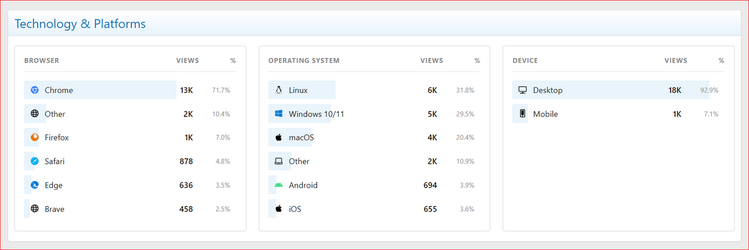 XenCustomize-Thread-View-Analytics-200-Dashboard-Technology-Platforms.png75.9 KB · Views: 179
 -
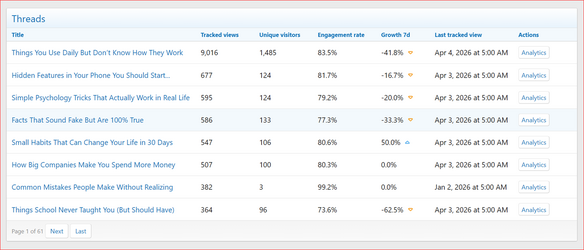 XenCustomize-Thread-View-Analytics-200-Dashboard-Threads.png189.2 KB · Views: 147
 -
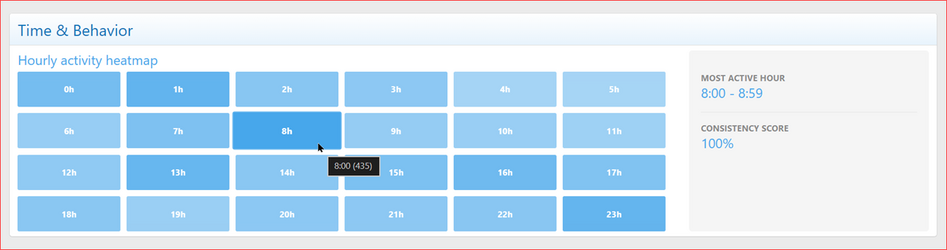 XenCustomize-Thread-View-Analytics-200-Dashboard-Time-Behavior.png49.4 KB · Views: 141
 -
 XenCustomize-Thread-View-Analytics-200-Dashboard-Top-Stat-Cards.png164.9 KB · Views: 139
 -
 XenCustomize-Thread-View-Analytics-200-Dashboard-Traffic-Sources.png100.8 KB · Views: 179
 -
 XenCustomize-Thread-View-Analytics-200-Dashboard-Trend-Metrics.png312 KB · Views: 146
 -
 XenCustomize-Thread-View-Analytics-200-Dashboard-View-Trends.png161.6 KB · Views: 181
 -
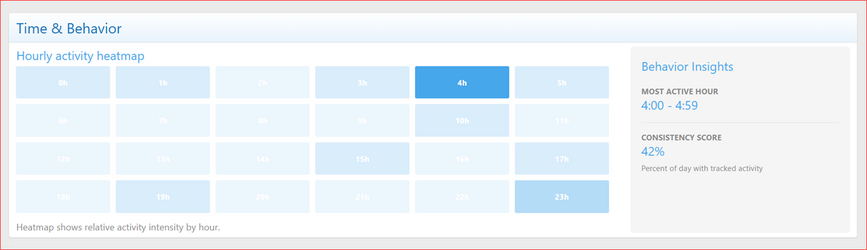 XenCustomize-Thread-View-Analytics-200-Thread-Analytics-Time-Behavior.png58 KB · Views: 177
 -
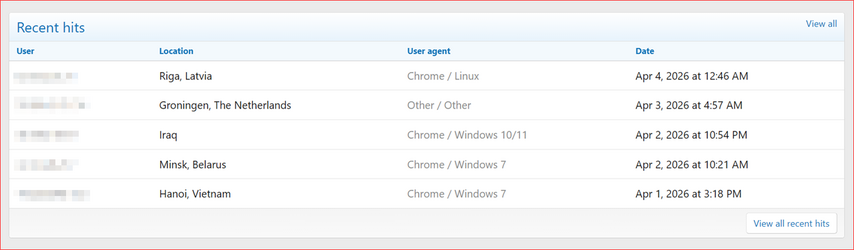 XenCustomize-Thread-View-Analytics-200-Thread-Analytics-Recent-Hits.png78.6 KB · Views: 158
 -
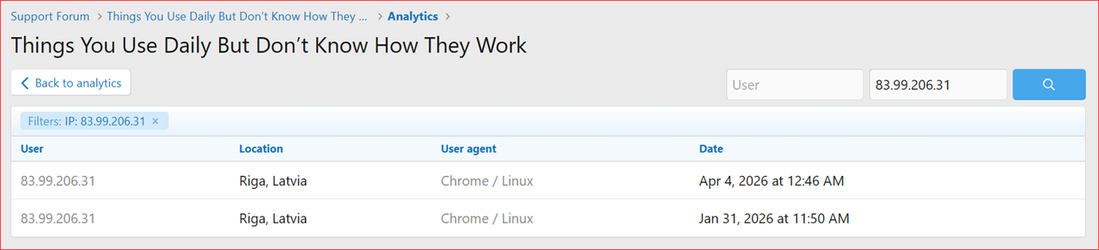 XenCustomize-Thread-View-Analytics-200-Thread-Analytics-Recent-Hits-Filters.png85.3 KB · Views: 153
 -
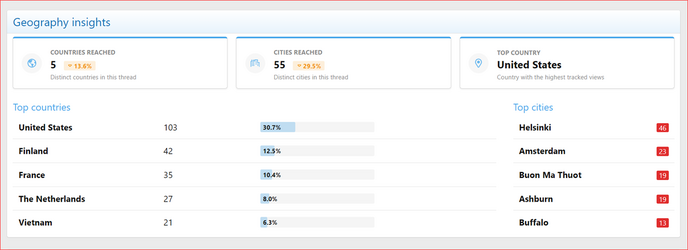 XenCustomize-Thread-View-Analytics-200-Thread-Analytics-Geography-Insights.png88.4 KB · Views: 172
 -
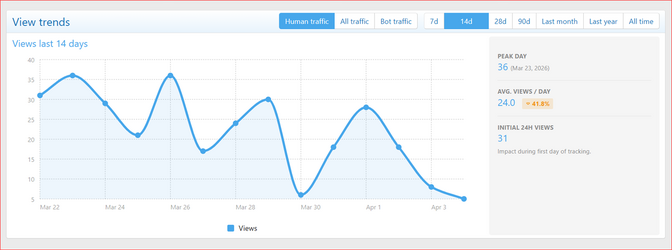 XenCustomize-Thread-View-Analytics-200-Thread-Analytics-View-Trends.png126.8 KB · Views: 176
 -
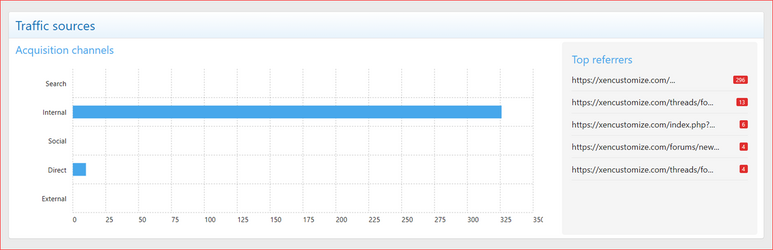 XenCustomize-Thread-View-Analytics-200-Thread-Analytics-Traffic-Sources.png101.9 KB · Views: 176
 -
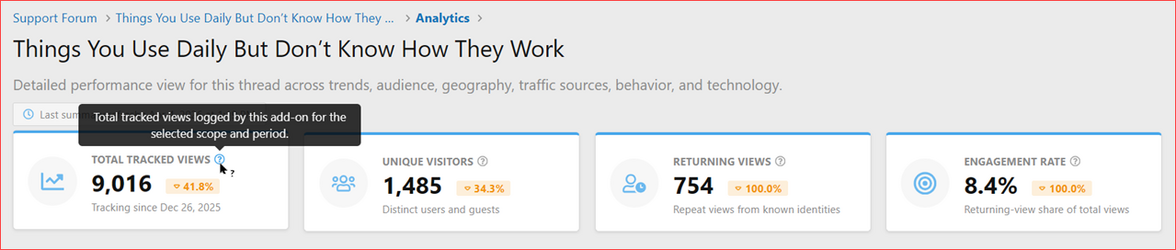 XenCustomize-Thread-View-Analytics-200-Thread-Analytics-Top-Stat-Cards.png129.7 KB · Views: 146


