

A new product by XenCustomize is available: Auto Archive Threads 2.0.0 - Automatically move threads out of active forums and into your archive area using reply limits, inactivity timers, thread age, or exact dates.
Keep discussions flowing smoothly and move old content where it belongs — automatically.
Auto Archive Threads lets you move threads into a target forum when the time is right, with zero manual work.
Create smart archive rules per thread or enforce global rules across forums.
Once set up, the addon runs in the background and moves threads to your archive area on schedule — fast, clean, and precise.
From reply limits to inactivity, thread age, or specific timestamps, you’re always in total control.
Per-thread auto-archive rules
Set archive behavior directly from the Thread Tools menu using a clean overlay interface.
Single rule per thread
Only one active rule at a time — no conflicts, clear outcomes.
Four useful archive triggers
Visual archive indicator
A clear info bar on the thread view shows when and why the thread will be archived.
Permission-based control
Manage who can set archive rules using a forum moderator permission:
→ “Set auto-archive rules for threads”
Automatic archive execution
Threads are moved to your archive forum through:
Global auto-archive rules (Admin controlled)
Define archive behavior across specific forums using admin options.
Global rule types
Choose archive destinations
Pick exactly which forum archived threads are moved into.
Forum selector for global rules
Apply rules only to the forums you choose.
Global archive settings
Rule priority system
Thread-specific rules override global rules for perfect flexibility.
Native moderator logs
Every automatic archive action is logged in the Moderator Log with a clear reason
(example: Archived due to inactivity).
Cron-powered system
Background processing ensures reliable archive actions without slowing anything down.
XenForo-native & safe
✔ Keeping old content organized in an archive section
✔ Clearing active forums of outdated topics
✔ Auto-organizing support and Q&A threads
✔ Handling event or sale threads on a schedule
✔ Preventing clutter without manual moderation
✔ Saving staff time — especially on busy forums
If you run an active community, this addon keeps things tidy, sorted, and stress-free — automatically.
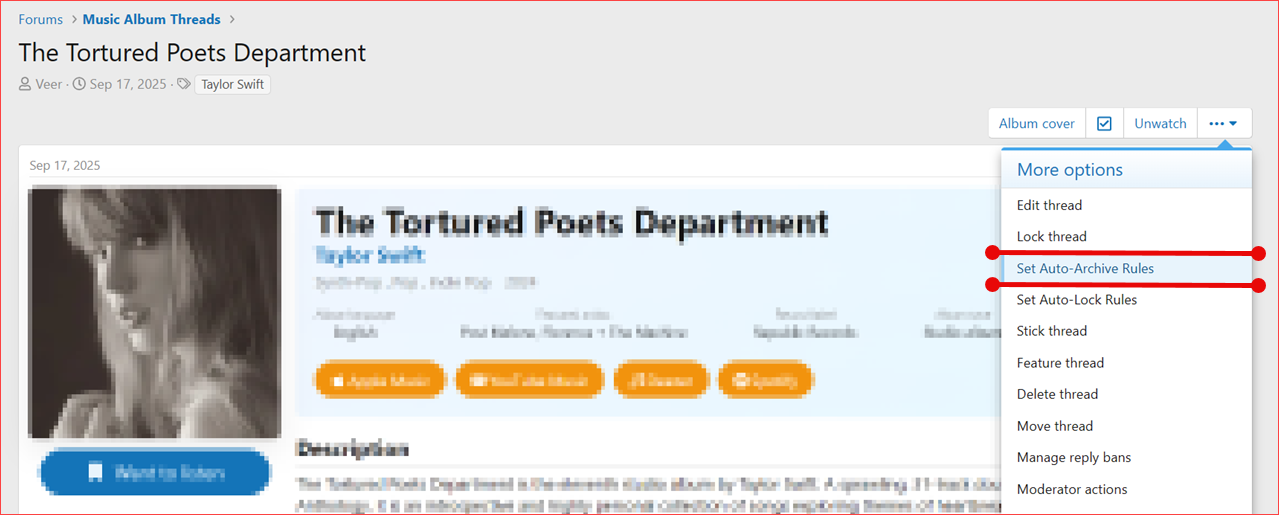
 Thread Tools → “Set Auto-Archive Rules” link
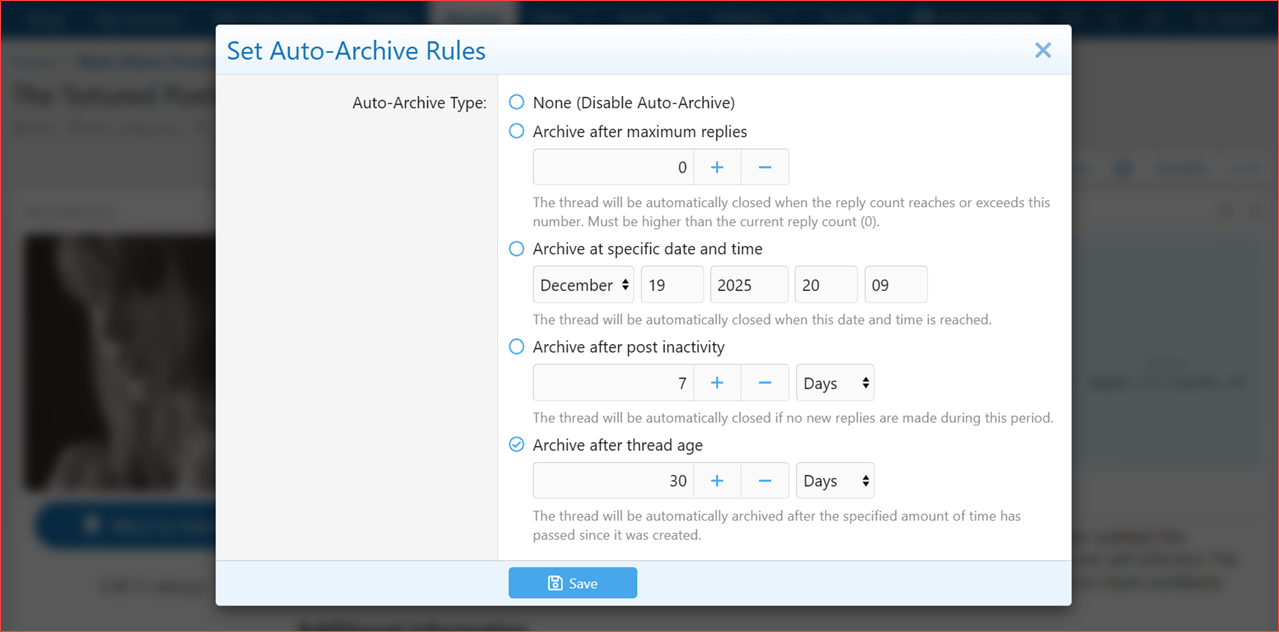
Auto-Archive Rules overlay (all rule options visible)




Thread info bar showing scheduled archive message
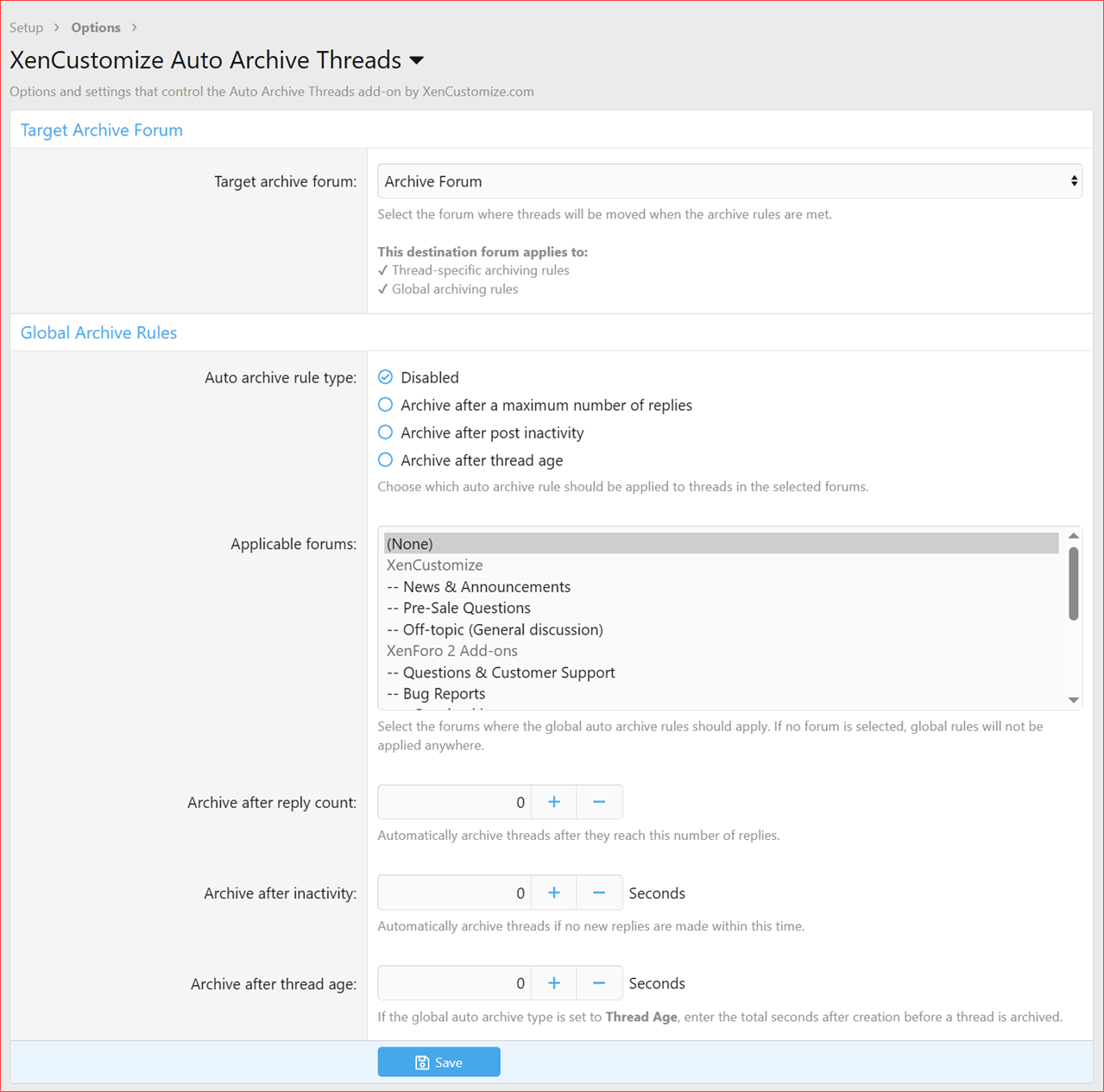
Admin options: Global auto-archive settings
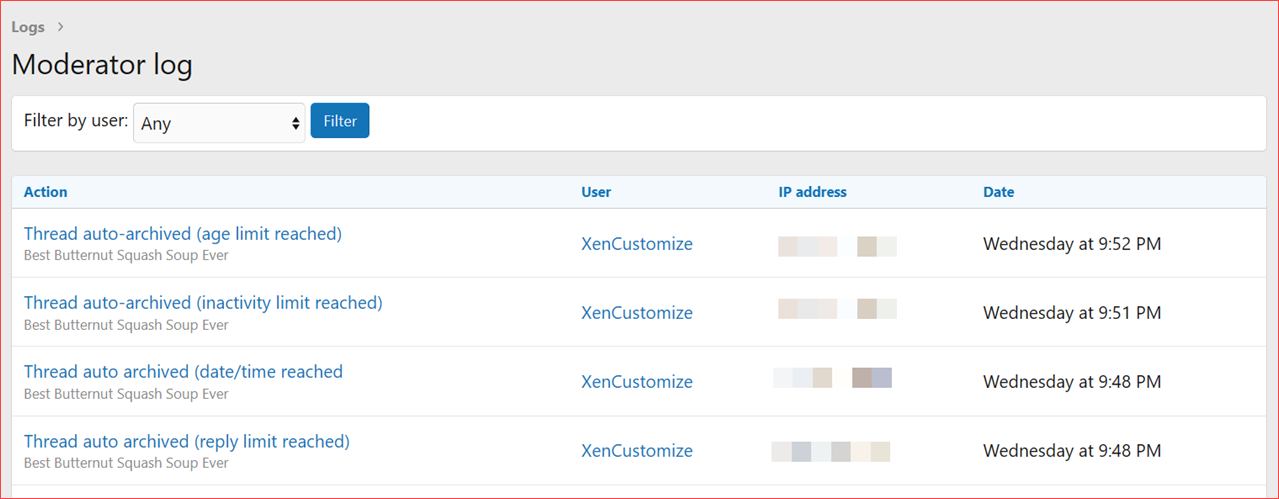
Moderator log entry for auto-archive thread

User group permission

Cron entry
Read more about this product...
 XenCustomize Auto Archive Threads for XenForo 2
Keep discussions flowing smoothly and move old content where it belongs — automatically.Auto Archive Threads lets you move threads into a target forum when the time is right, with zero manual work.
Create smart archive rules per thread or enforce global rules across forums.
Once set up, the addon runs in the background and moves threads to your archive area on schedule — fast, clean, and precise.
From reply limits to inactivity, thread age, or specific timestamps, you’re always in total control.
 Key Features
 Archive after X replies
 Archive at a specific date & time
 Archive after post inactivity
 Archive after thread age (since creation)
 Per-thread rules via Thread Tools menu
 Global auto-archive rules for selected forums
 Define a target Archive Forum via Admin Options
 Permission-based access (moderators only)
 Smart rule priority (per-thread overrides global)
 Moderator log entries for every auto-lock action
 High-performance cron job handling
 Complete Features List
Per-thread auto-archive rulesSet archive behavior directly from the Thread Tools menu using a clean overlay interface.
Single rule per thread
Only one active rule at a time — no conflicts, clear outcomes.
Four useful archive triggers
- Archive after a maximum reply count
- Archive at a specific date & time
- Archive after post inactivity (since last reply)
- Archive after thread age (since creation)
Visual archive indicator
A clear info bar on the thread view shows when and why the thread will be archived.
Permission-based control
Manage who can set archive rules using a forum moderator permission:
→ “Set auto-archive rules for threads”
Automatic archive execution
Threads are moved to your archive forum through:
- Thread view checks
- New reply submissions
- Background cron job
Global auto-archive rules (Admin controlled)
Define archive behavior across specific forums using admin options.
Global rule types
- Disabled (default)
- Archive after maximum replies
- Archive after post inactivity
- Archive after thread age
Choose archive destinations
Pick exactly which forum archived threads are moved into.
Forum selector for global rules
Apply rules only to the forums you choose.
Global archive settings
- Reply count limit
- Inactivity threshold (seconds)
- Thread age (seconds since creation)
Rule priority system
Thread-specific rules override global rules for perfect flexibility.
Native moderator logs
Every automatic archive action is logged in the Moderator Log with a clear reason
(example: Archived due to inactivity).
Cron-powered system
Background processing ensures reliable archive actions without slowing anything down.
XenForo-native & safe
- Works with XenForo 2.2 and XenForo 2.3
- Full permission + logging support
Perfect For
✔ Keeping old content organized in an archive section✔ Clearing active forums of outdated topics
✔ Auto-organizing support and Q&A threads
✔ Handling event or sale threads on a schedule
✔ Preventing clutter without manual moderation
✔ Saving staff time — especially on busy forums
If you run an active community, this addon keeps things tidy, sorted, and stress-free — automatically.
 Screenshots
Thread Tools → “Set Auto-Archive Rules” link Auto-Archive Rules overlay (all rule options visible) Thread info bar showing scheduled archive message Admin options: Global auto-archive settings Moderator log entry for auto-archive thread User group permission Cron entryRead more about this product...


